> ## Documentation Index
> Fetch the complete documentation index at: https://docs.probaseapp.com/llms.txt
> Use this file to discover all available pages before exploring further.
# ProBase system checklists
> Ready-made checklist templates that match your industry
## What are ProBase checklists?
Alongside the checklists you build yourself, ProBase provides ready-made checklist templates for common industries. In your Checklists library they're marked with a **ProBase** tag.
For example, pool professionals get two ready-made pool chemistry checklists out of the box — a **Chemical Readings** template for capturing the standard water readings (free chlorine, pH, and more) and a **Chemical Adjustments** template for recording the chemicals you added — so you don't have to build them from scratch. Because these questions are set to feed the visit's [service records](/routes/service-records), the readings and adjustments your crew captures flow straight into the property's chemistry history.
## Automatic attachment by industry
ProBase checklists are added automatically to the services that match your business's industry. When this happens, you'll see a banner in your Checklists library letting you know:
> **ProBase checklists added to your services** — We attached ProBase checklists to services with a matching industry. Open one to review and detach where it doesn't apply.
You don't have to do anything to turn them on — but you're always in control of which services they apply to (see [Choosing which services use a ProBase checklist](#choosing-which-services-use-a-probase-checklist) below).
## Viewing a ProBase checklist
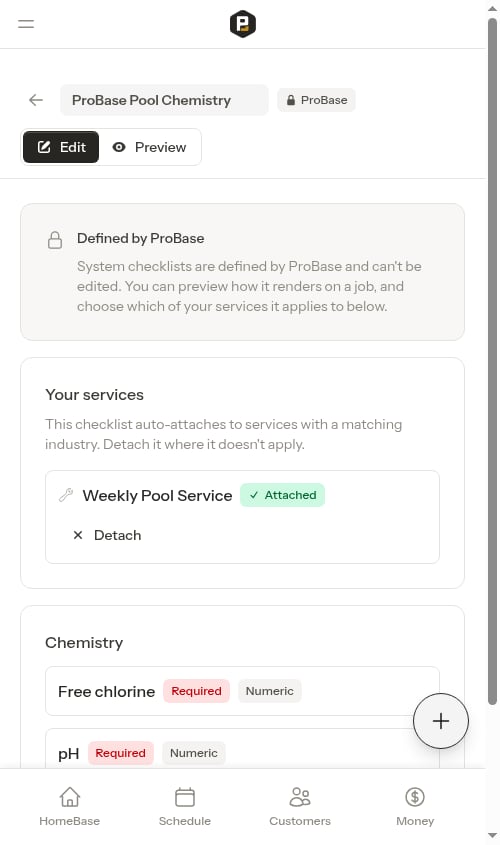
Open a ProBase checklist from the library and you'll land on a **locked, read-only view**. A lock indicator and a "Defined by ProBase" note explain that these templates are maintained by ProBase and can't be edited. There's no Save button, because there's nothing to change in the checklist itself.
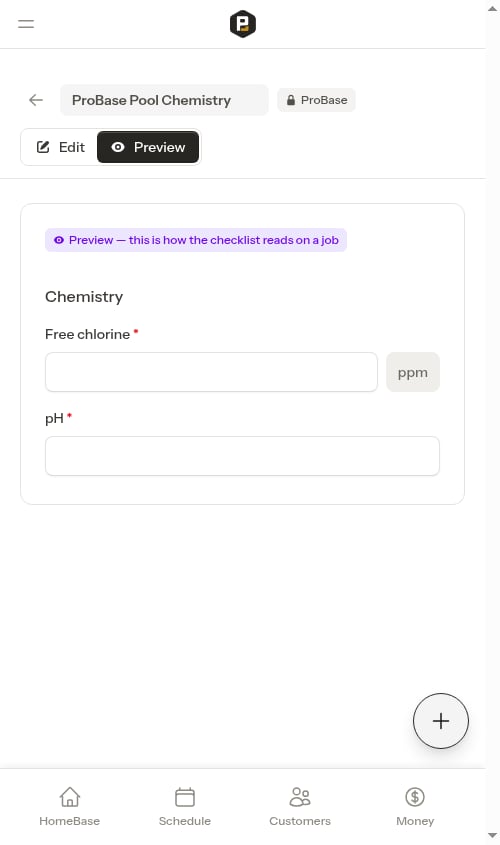
 You can still switch to **Preview** to see exactly how the checklist renders on a job, just like your own checklists.
 ## Choosing which services use a ProBase checklist
Even though you can't edit a ProBase checklist's questions, you decide which of your services it applies to. On the locked view, each of your matching services is listed with an **Attach / Detach** control:
* Services the checklist is currently on show **Attached**, with a **Detach** button.
* Tap **Detach** on a service where the checklist doesn't apply, and it flips to **Detached** with an **Attach** button so you can add it back later.
## Choosing which services use a ProBase checklist
Even though you can't edit a ProBase checklist's questions, you decide which of your services it applies to. On the locked view, each of your matching services is listed with an **Attach / Detach** control:
* Services the checklist is currently on show **Attached**, with a **Detach** button.
* Tap **Detach** on a service where the checklist doesn't apply, and it flips to **Detached** with an **Attach** button so you can add it back later.
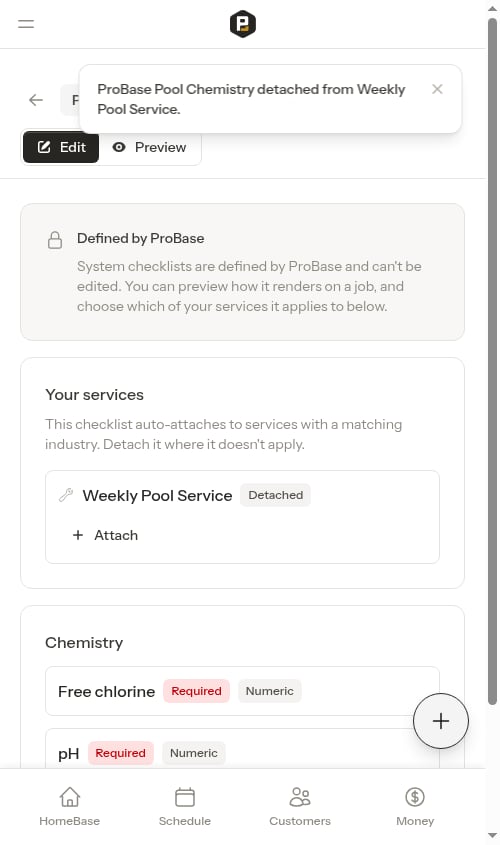 This lets you keep the ProBase checklist on the services where it makes sense and remove it from the ones where it doesn't — without affecting other businesses or the template itself.
## New versions
ProBase occasionally publishes an improved version of a checklist. When a newer version is available for a checklist attached to your services, you'll see a banner in your library:
> **A newer checklist version is available** — ProBase published a new version of a checklist attached to your services. Open it to upgrade each service.
Tap **Review** to open the checklist and choose to upgrade your services to the new version. Your existing services keep working on their current version until you upgrade them.
This lets you keep the ProBase checklist on the services where it makes sense and remove it from the ones where it doesn't — without affecting other businesses or the template itself.
## New versions
ProBase occasionally publishes an improved version of a checklist. When a newer version is available for a checklist attached to your services, you'll see a banner in your library:
> **A newer checklist version is available** — ProBase published a new version of a checklist attached to your services. Open it to upgrade each service.
Tap **Review** to open the checklist and choose to upgrade your services to the new version. Your existing services keep working on their current version until you upgrade them.