> ## Documentation Index
> Fetch the complete documentation index at: https://docs.probaseapp.com/llms.txt
> Use this file to discover all available pages before exploring further.
# How marketplace syncing works
> When marketplace customers, jobs, and payouts refresh in ProBase — and how to pull the latest right now
## Overview
Once a [marketplace account is connected](/marketplace/connecting-accounts), ProBase keeps a copy of that work so it sits on your schedule next to your own jobs. Syncing is **one-way**: the marketplace is the source of truth, and ProBase reads from it. Nothing you do in ProBase is pushed back out to the marketplace.
That's why marketplace records are read-only in ProBase — the real actions (starting, completing, rescheduling, cancelling, messaging) happen in the marketplace app, and the result comes back to ProBase on the next sync.
## What comes across
| What | What you get in ProBase |
| ------------- | ----------------------------------------------------------------------------------------------------------------------------------------------------------------------------------------------------------------------------------------------------------------------- |
| Customer | First and last name, plus the service address. **No phone number or email** — messaging runs through the marketplace app |
| Property | Address, map, and any access notes the marketplace has on file |
| Service | The service name, the **frequency** — how often the marketplace has it repeating — and the **payout**, what one visit of it pays you |
| Jobs (visits) | The day the visit is due and its status, on your calendar and daily route. The marketplace sets the **day**; ProBase fills in the start time and expected length — see [Where the start time comes from](/marketplace/marketplace-jobs#where-the-start-time-comes-from) |
| Job notes | The property's access notes and the customer's instructions for the job (*Please do not come before 10 am*), shown read-only in the visit's [**Job notes** briefing](/marketplace/marketplace-jobs#job-notes) |
| Money | Your full marketplace billing history — job earnings, tips, bonuses, fees, adjustments, and payout deposits — as locked entries on a customer record named after the marketplace, each dated the day the money moved on the marketplace |
## How often it refreshes on its own
You don't have to do anything to keep marketplace work current:
* **Every 15 minutes** — ProBase checks each connected account for new and changed **customers, properties, services, and jobs**. A job you claim in the marketplace app shows up on your ProBase schedule within about that window.
* **Every night** — a full refresh runs in the early morning, local to your business, so your book is clean by the time you start the day. The nightly run also brings across your **earnings and payout deposits**.
* **Right after you leave for the app** — when you tap a button like **Open in LawnStarter** or **Reschedule in LawnStarter**, ProBase starts checking that one job much more often for a while, so whatever you do in the app shows up in ProBase quickly without you asking.
**The money side refreshes on a slower rhythm than your schedule.** The 15-minute check keeps your customers and jobs current; earnings and payout deposits come across with the nightly refresh, with a [**Full re-sync**](/marketplace/connecting-accounts#sync-status-and-a-full-re-sync), or when you tap **Refresh** on the marketplace record's [Billing History](/marketplace/payouts). So a deposit that lands mid-morning may not appear until you refresh or until that night.
The marketplace can't notify ProBase the instant something changes, so there's always a short lag. If you need the very latest, use **Refresh** below.
## Refresh one record now
Every marketplace-synced screen — customer, property, service, job, and the marketplace record's [Billing History](/marketplace/payouts) — shows a small **Last synced …** line with a **Refresh** link next to it.
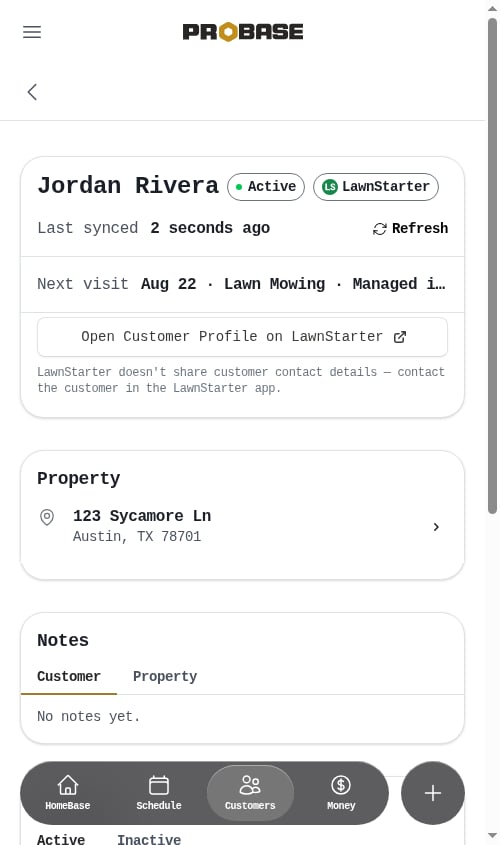 Tap **Refresh** to pull that record's latest details straight from the marketplace. Nothing jumps around while it works: the **Last synced** time stays where it is, the small circular arrow beside it starts spinning, and the link itself reads **Syncing…** until the pull finishes and the timestamp updates.
* While it reads **Syncing…** the link can't be tapped again, so you can't set a second pull going on top of the first.
* Hover (or long-press) the timestamp to see the exact date and time of the last sync.
* If the refresh can't complete, the line turns into a short message with a **Try again** link.
* On a job, refreshing over and over is throttled — tap too fast and you'll see "Just refreshed — give it a moment before trying again." Wait a minute and try again.
On a **customer**, **property**, or **service** page the refresh pulls that customer's whole record — their properties, services, and visits — so one tap catches everything about them. On the marketplace record's **Billing History**, it pulls the latest earnings and payout deposits instead. See [Marketplace earnings & payouts](/marketplace/payouts).
### How old is "Last synced"?
The timestamp counts up on its own while you're looking at the page — *Last synced 12 seconds ago* becomes *13 seconds ago*, then rolls over to *1 minute ago*, *2 minutes ago*, and so on, without you reloading anything. So the age you see is always the real age, even if you've left the job open on your phone for a while.
Tap **Refresh** to pull that record's latest details straight from the marketplace. Nothing jumps around while it works: the **Last synced** time stays where it is, the small circular arrow beside it starts spinning, and the link itself reads **Syncing…** until the pull finishes and the timestamp updates.
* While it reads **Syncing…** the link can't be tapped again, so you can't set a second pull going on top of the first.
* Hover (or long-press) the timestamp to see the exact date and time of the last sync.
* If the refresh can't complete, the line turns into a short message with a **Try again** link.
* On a job, refreshing over and over is throttled — tap too fast and you'll see "Just refreshed — give it a moment before trying again." Wait a minute and try again.
On a **customer**, **property**, or **service** page the refresh pulls that customer's whole record — their properties, services, and visits — so one tap catches everything about them. On the marketplace record's **Billing History**, it pulls the latest earnings and payout deposits instead. See [Marketplace earnings & payouts](/marketplace/payouts).
### How old is "Last synced"?
The timestamp counts up on its own while you're looking at the page — *Last synced 12 seconds ago* becomes *13 seconds ago*, then rolls over to *1 minute ago*, *2 minutes ago*, and so on, without you reloading anything. So the age you see is always the real age, even if you've left the job open on your phone for a while.
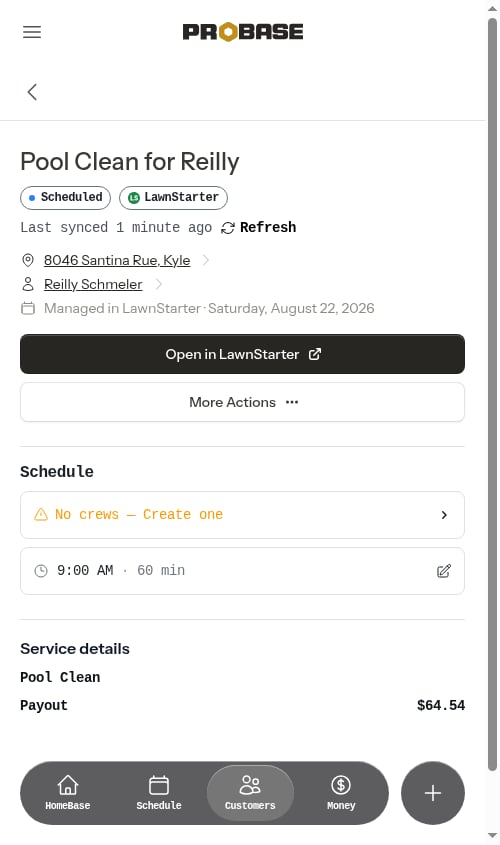 Hover or long-press the timestamp if you want the exact date and time instead of the "X ago" wording.
## Refresh everything for an account
To pull your entire marketplace book again rather than one record, use **Full re-sync** on the connected card under **Integrations**. See [Sync status and a full re-sync](/marketplace/connecting-accounts#sync-status-and-a-full-re-sync).
Hover or long-press the timestamp if you want the exact date and time instead of the "X ago" wording.
## Refresh everything for an account
To pull your entire marketplace book again rather than one record, use **Full re-sync** on the connected card under **Integrations**. See [Sync status and a full re-sync](/marketplace/connecting-accounts#sync-status-and-a-full-re-sync).
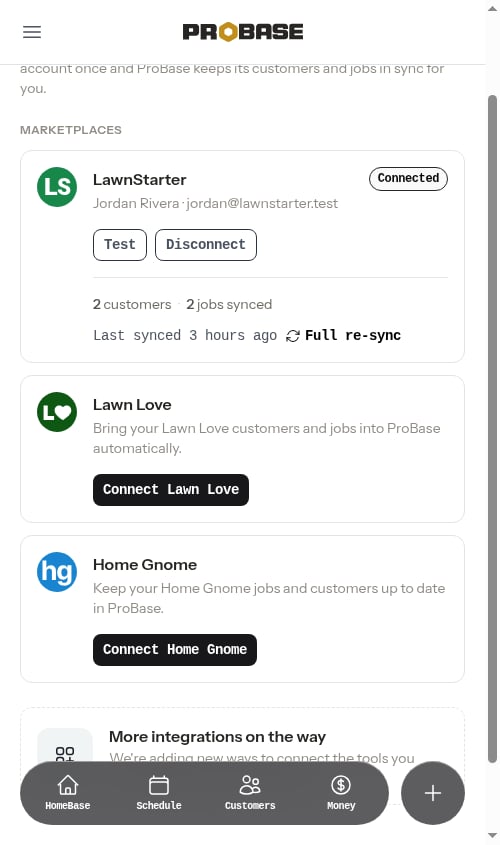 A full re-sync runs in the background rather than making you wait: you get a confirmation right away and the records update over the next few minutes. While it runs, the **Full re-sync** control reads **Syncing…** with a spinning arrow and can't be tapped again, and it flips itself back to **Full re-sync** with **Last synced just now** when the pull finishes — no reloading needed.
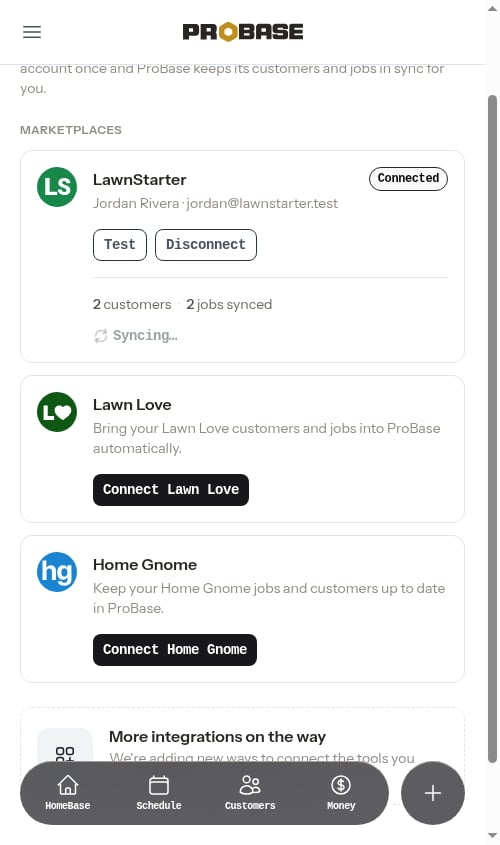 Once ProBase has sized up your book, a progress bar shows how far the run has got — a percentage plus a tally like *12 of 27 customers synced* — and ticks up on its own about once a second while you watch.
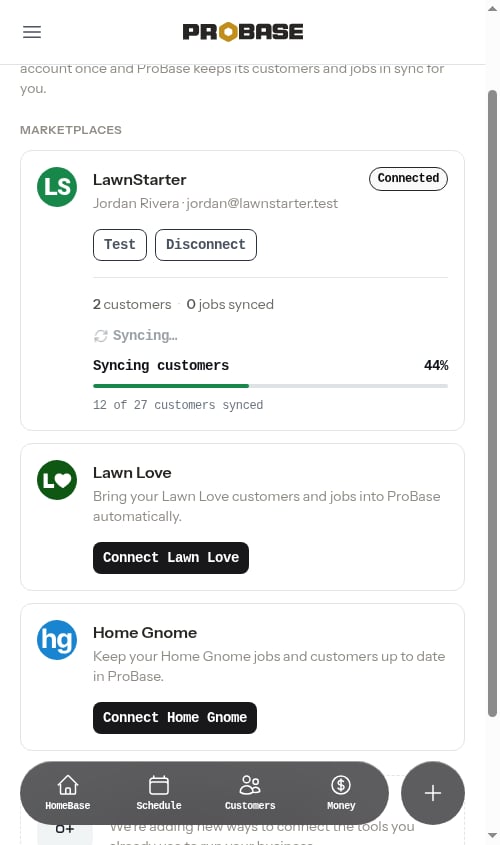 If a run stops before it finishes, the card reads *The last full re-sync didn't finish.* with a **Try again** link. And if a run you asked for never gets going at all, the card doesn't sit on **Syncing…** indefinitely — it gives up after about half an hour and offers **Full re-sync** again. See [Sync status and a full re-sync](/marketplace/connecting-accounts#sync-status-and-a-full-re-sync).
## When something looks wrong
Open **Integrations** in the **BUSINESS** group. An expired connection stops syncing entirely until you reconnect — you'll also see an amber banner on HomeBase. See [Reconnecting an expired account](/marketplace/connecting-accounts#reconnecting-an-expired-account).
On the customer, job, or service that looks stale, tap **Refresh** next to **Last synced**.
Still off? Tap **Full re-sync** on the account's card to pull the whole book again. It works in the background — the card reads **Syncing…**, then shows a progress bar counting your customers through, and updates itself when it's done. If it reads *The last full re-sync didn't finish*, tap **Try again**. If you've just reconnected the account, running it right away is fine — it will pick up everything that changed while the connection was down.
Use **Test** on the card to confirm ProBase can still reach the marketplace and is looking at the right account. See [Testing a connection](/marketplace/connecting-accounts#testing-a-connection).
A job that was cancelled on the marketplace side changes status in ProBase on the next sync; one that's no longer assigned to you disappears from it. Either way you don't need to clean it up by hand — see [Work that disappears from the marketplace](#work-that-disappears-from-the-marketplace).
## Work that disappears from the marketplace
Syncing keeps ProBase matching the marketplace in both directions: it adds what's new **and** removes what's gone. If a customer, property, service, or visit is no longer on your marketplace account — the customer was reassigned, a duplicate visit was cleaned up, the job was pulled — the matching record disappears from ProBase on the next sync.
### Jobs that are no longer assigned to you
A visit only appears in ProBase while the marketplace has it assigned to **you**. If it goes back to the marketplace — taken off you, or returned to the pool while it waits to be picked up by another pro — it's removed from ProBase on the next sync rather than being left on your schedule as something you still owe. Work that was never assigned to you doesn't sync in at all.
* A **cancelled** visit is different: it stays on your schedule marked **Cancelled**, so you keep the record.
* The removal happens even if the visit was already hidden in ProBase — for example because you'd [archived that customer](/customers/archiving-customers).
* If the same work is assigned back to you later, it syncs in again as a new job.
See [If a job goes back to the marketplace](/marketplace/marketplace-jobs#if-a-job-goes-back-to-the-marketplace).
### What's never removed
* Only **marketplace-synced** records are removed this way. Customers, properties, services, and jobs you created yourself in ProBase are never touched, and neither are records from a different marketplace account.
* **Your history is safe.** Past visits that have already aged out of the marketplace's recent window stay in ProBase, so your completed-work record and earnings history don't thin out over time.
* **Your earnings record is never removed.** The customer record named after the marketplace — the one that holds your [earnings and payout ledger](/marketplace/payouts) — isn't one of the marketplace's own customers, so this cleanup always skips it. Your money history stays put no matter how your customer book changes.
* If the marketplace can only be reached partway during a sync, ProBase skips the removal step entirely for that run rather than risk deleting work that's simply missing from a half-finished response.
Removals are permanent — a record that comes off the marketplace is deleted from ProBase, not archived. If the same work is later restored on the marketplace, it syncs back in as a new record.
## Next steps
* [Marketplace jobs](/marketplace/marketplace-jobs) — what you can and can't do on a synced visit
* [Marketplace customers](/marketplace/marketplace-customers) — the read-only customer, property, and service pages
* [Marketplace earnings & payouts](/marketplace/payouts) — earnings and deposit history
If a run stops before it finishes, the card reads *The last full re-sync didn't finish.* with a **Try again** link. And if a run you asked for never gets going at all, the card doesn't sit on **Syncing…** indefinitely — it gives up after about half an hour and offers **Full re-sync** again. See [Sync status and a full re-sync](/marketplace/connecting-accounts#sync-status-and-a-full-re-sync).
## When something looks wrong
Open **Integrations** in the **BUSINESS** group. An expired connection stops syncing entirely until you reconnect — you'll also see an amber banner on HomeBase. See [Reconnecting an expired account](/marketplace/connecting-accounts#reconnecting-an-expired-account).
On the customer, job, or service that looks stale, tap **Refresh** next to **Last synced**.
Still off? Tap **Full re-sync** on the account's card to pull the whole book again. It works in the background — the card reads **Syncing…**, then shows a progress bar counting your customers through, and updates itself when it's done. If it reads *The last full re-sync didn't finish*, tap **Try again**. If you've just reconnected the account, running it right away is fine — it will pick up everything that changed while the connection was down.
Use **Test** on the card to confirm ProBase can still reach the marketplace and is looking at the right account. See [Testing a connection](/marketplace/connecting-accounts#testing-a-connection).
A job that was cancelled on the marketplace side changes status in ProBase on the next sync; one that's no longer assigned to you disappears from it. Either way you don't need to clean it up by hand — see [Work that disappears from the marketplace](#work-that-disappears-from-the-marketplace).
## Work that disappears from the marketplace
Syncing keeps ProBase matching the marketplace in both directions: it adds what's new **and** removes what's gone. If a customer, property, service, or visit is no longer on your marketplace account — the customer was reassigned, a duplicate visit was cleaned up, the job was pulled — the matching record disappears from ProBase on the next sync.
### Jobs that are no longer assigned to you
A visit only appears in ProBase while the marketplace has it assigned to **you**. If it goes back to the marketplace — taken off you, or returned to the pool while it waits to be picked up by another pro — it's removed from ProBase on the next sync rather than being left on your schedule as something you still owe. Work that was never assigned to you doesn't sync in at all.
* A **cancelled** visit is different: it stays on your schedule marked **Cancelled**, so you keep the record.
* The removal happens even if the visit was already hidden in ProBase — for example because you'd [archived that customer](/customers/archiving-customers).
* If the same work is assigned back to you later, it syncs in again as a new job.
See [If a job goes back to the marketplace](/marketplace/marketplace-jobs#if-a-job-goes-back-to-the-marketplace).
### What's never removed
* Only **marketplace-synced** records are removed this way. Customers, properties, services, and jobs you created yourself in ProBase are never touched, and neither are records from a different marketplace account.
* **Your history is safe.** Past visits that have already aged out of the marketplace's recent window stay in ProBase, so your completed-work record and earnings history don't thin out over time.
* **Your earnings record is never removed.** The customer record named after the marketplace — the one that holds your [earnings and payout ledger](/marketplace/payouts) — isn't one of the marketplace's own customers, so this cleanup always skips it. Your money history stays put no matter how your customer book changes.
* If the marketplace can only be reached partway during a sync, ProBase skips the removal step entirely for that run rather than risk deleting work that's simply missing from a half-finished response.
Removals are permanent — a record that comes off the marketplace is deleted from ProBase, not archived. If the same work is later restored on the marketplace, it syncs back in as a new record.
## Next steps
* [Marketplace jobs](/marketplace/marketplace-jobs) — what you can and can't do on a synced visit
* [Marketplace customers](/marketplace/marketplace-customers) — the read-only customer, property, and service pages
* [Marketplace earnings & payouts](/marketplace/payouts) — earnings and deposit history