> ## Documentation Index
> Fetch the complete documentation index at: https://docs.probaseapp.com/llms.txt
> Use this file to discover all available pages before exploring further.
# Marketplace customers
> How marketplace customers, properties, and services look in ProBase
## Overview
Customers you're matched with through a connected marketplace appear in your ProBase customer list alongside your own customers, so your whole book is in one place. They're **read-only**: the marketplace owns the relationship, sets what the job pays, and bills the customer, so ProBase shows the record and points you to the marketplace app for anything that changes it.
## The customer page
A marketplace customer's page is laid out like any other customer's. Under their name sits a **LawnStarter** pill (naming whichever marketplace they came from) alongside their status, and below that the **Last synced** line with a **Refresh** link.
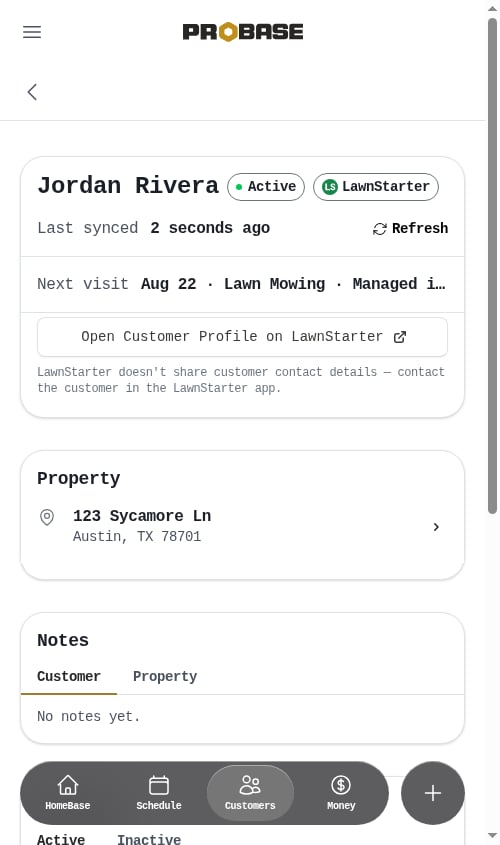 What you'll see:
* **Name** and a **Property** card with the service address — tap it to open the property
* **Contact** — a short section holding the two ways to reach that customer on the marketplace: **Message on LawnStarter**, which opens their message thread, and **Open in LawnStarter**, which opens their profile there. Underneath is a note that the marketplace doesn't share contact details
* **Services** showing what each visit pays you and how often it repeats — *Weekly*, *Bi-weekly*, *Monthly*, and so on — each with a **Managed in LawnStarter** tag next to it
* **Recent activity** — the visits on that customer's history
What's deliberately not there:
* **Phone number and email** — contact details never cross over from the marketplace; you reach the customer through the marketplace's in-app messaging
* **Account balance, card on file, and Billing History** — the marketplace bills the customer and pays you, so there's no balance to collect here. Your marketplace earnings live on [the marketplace's own record](#the-marketplaces-own-record) instead
* **Edit**, and the **+** beside **Services** that books a new job on your own customers — new marketplace work arrives by claiming it in the marketplace app, not by scheduling it in ProBase
**Message on LawnStarter** needs a job to open — on the marketplace, message threads live on the visit rather than on the customer — so it appears once that customer has at least one synced job. **Open in LawnStarter** only needs the customer, so it's there either way.
## The property page
A marketplace property shows the address, map, and services, with the **LawnStarter** pill and the **Last synced** line under the address at the top. The **Edit** action and the option to add a new service to that property are not available — properties and services come from the marketplace.
## The service page
A marketplace service is a short page: the service name, how often it repeats, what the visit pays you, and the appointment history — with a **LawnStarter** pill beside the service's status at the top and the **Last synced** line, and its **Refresh** link, below.
What you'll see:
* **Name** and a **Property** card with the service address — tap it to open the property
* **Contact** — a short section holding the two ways to reach that customer on the marketplace: **Message on LawnStarter**, which opens their message thread, and **Open in LawnStarter**, which opens their profile there. Underneath is a note that the marketplace doesn't share contact details
* **Services** showing what each visit pays you and how often it repeats — *Weekly*, *Bi-weekly*, *Monthly*, and so on — each with a **Managed in LawnStarter** tag next to it
* **Recent activity** — the visits on that customer's history
What's deliberately not there:
* **Phone number and email** — contact details never cross over from the marketplace; you reach the customer through the marketplace's in-app messaging
* **Account balance, card on file, and Billing History** — the marketplace bills the customer and pays you, so there's no balance to collect here. Your marketplace earnings live on [the marketplace's own record](#the-marketplaces-own-record) instead
* **Edit**, and the **+** beside **Services** that books a new job on your own customers — new marketplace work arrives by claiming it in the marketplace app, not by scheduling it in ProBase
**Message on LawnStarter** needs a job to open — on the marketplace, message threads live on the visit rather than on the customer — so it appears once that customer has at least one synced job. **Open in LawnStarter** only needs the customer, so it's there either way.
## The property page
A marketplace property shows the address, map, and services, with the **LawnStarter** pill and the **Last synced** line under the address at the top. The **Edit** action and the option to add a new service to that property are not available — properties and services come from the marketplace.
## The service page
A marketplace service is a short page: the service name, how often it repeats, what the visit pays you, and the appointment history — with a **LawnStarter** pill beside the service's status at the top and the **Last synced** line, and its **Refresh** link, below.
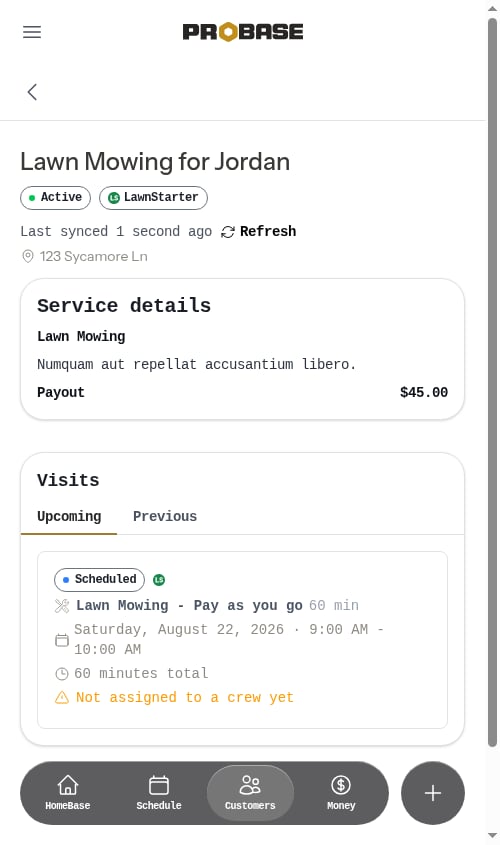 Under **Service details** you'll see:
* **The service name** — and its description, if the marketplace sent one
* **Frequency** — how often the marketplace has this service repeating, in plain words: *Weekly*, *Bi-weekly*, *Monthly*, *Every 2 months*, and so on. It's there to read, not to change — see [How often a marketplace service repeats](#how-often-a-marketplace-service-repeats) below
* **Payout** — what the marketplace pays you for one visit of this service. It's shown for reference only and can't be edited, and there are no service items to add
That's the whole section. There's no itemized breakdown and no **Total** line the way there is on your own services, because the marketplace sets what the visit pays and handles the customer's bill itself. It's the same short summary wherever that service turns up — the [job detail page](/marketplace/marketplace-jobs), your day's stops, and overdue jobs all show the identical name, **Frequency**, and **Payout**, so it reads the same everywhere.
The amount on a marketplace service is **your** money, not the customer's bill — it's the per-visit payout the marketplace sends you, which is why the row reads **Payout** instead of **Price**. What the marketplace charges the homeowner never comes across to ProBase. See [Marketplace earnings & payouts](/marketplace/payouts).
What isn't on the page, because the marketplace owns it:
* **No Service plan section** — that's the block on your own services where you'd change the frequency, the invoice type, and the schedule. The marketplace owns all of it, so it isn't shown; the frequency you can *read* sits in **Service details** instead
* **No + Schedule Appointment button** — new visits arrive from the marketplace; you can't add one in ProBase
* **No pricing edit** — the payout comes from the marketplace
* **No Cancel** — a customer or marketplace cancellation syncs back to ProBase on its own
**Appointment History** works the same as on your own services, with **Recent Activity** and **Future Appointments** tabs. Tap any visit to open it — see [Marketplace jobs](/marketplace/marketplace-jobs) for what you can do there.
### How often a marketplace service repeats
The marketplace decides the cadence — every week, every other week, once a month — and ProBase copies it across so you can see it without opening the marketplace app. It shows up in three places:
* On the **service page**, as the **Frequency** row under **Service details**
* On the **service cards** on the customer and property pages, next to the payout, alongside a **Managed in LawnStarter** tag
* On the **[job detail page](/marketplace/marketplace-jobs)**, in that job's **Service details** — and, on visits that aren't due today, in the line under the job title next to the date
It's a read-only copy of what the marketplace has set. Changing how often a marketplace service repeats is done in the marketplace app — there's no frequency to edit in ProBase, and ProBase never books the repeat visits itself. Each visit arrives from the marketplace on its own as it's scheduled there, so the **Future Appointments** tab shows what the marketplace has already booked rather than a chain ProBase built. See [How marketplace syncing works](/marketplace/how-syncing-works).
**If a service doesn't show a frequency**, the marketplace didn't send one for it. The service then simply reads **Managed in LawnStarter** where the cadence would be, rather than guessing.
A finished or cancelled marketplace service can read **One-time** even though it used to repeat — once the marketplace stops running a service, it stops reporting a repeat cadence for it. The visit history on the page is the reliable record of what actually happened.
## In your customer list
Marketplace customers appear in your normal customer list and search results, so you can look someone up whether they came from the marketplace or from your own book.
You can tell them apart at a glance by the round icon at the start of the row: your own customers show the plain grey person icon, while a marketplace customer shows the **marketplace's logo** in its place. Same size, same spot, so the list still lines up neatly — the logo simply replaces the person icon rather than being added alongside the name.
### In the New Job and New Quote wizards
Marketplace customers also show up in the customer picker of the [New Job](/getting-started/creating-jobs) and [New Quote](/customers/creating-quotes) wizards — but they can't be selected. Each one is dimmed, shows the marketplace's logo in place of the person icon, carries a lock icon on the right, and reads *Managed by LawnStarter — not schedulable here* where the address would normally be. Tapping one shows *This customer is managed by LawnStarter and can't be scheduled here.* and the wizard stays on the customer step.
This is on purpose: the marketplace sets the price and the schedule for its own customers, so adding a ProBase job or quote on top of one would create work the marketplace doesn't know about. New marketplace work reaches your schedule by claiming it in the marketplace app — see [Available to claim](/marketplace/claiming-jobs).
## The marketplace's own record
Alongside the people you serve, you'll also see a record named after the marketplace itself — a customer called **LawnStarter** (or **Lawn Love** / **Home Gnome**). That's not a homeowner: it's where ProBase keeps the money side of the relationship. Its **Billing History** holds what the marketplace has earned you and what it has deposited, so it's the one marketplace record that *does* have a balance and a billing page.
Because it stands for the marketplace rather than a person, it has no **Contact** section — there's no thread to message and no customer profile to open on the marketplace side.
See [Marketplace earnings & payouts](/marketplace/payouts) for how to read it.
## Notes
Notes that came from the marketplace are read-only wherever they appear — the property's access details, and anything the customer told the marketplace about how the job should be done. Those instructions belong to the service, so they show up on every visit of it, in the visit's [**Job notes** briefing](/marketplace/marketplace-jobs#job-notes).
You can still add your own notes on a marketplace **customer** or **property** page — handy for your own reminders — but not on a marketplace **job**, where the notes come straight from the marketplace.
Because they're synced, marketplace notes always match what the marketplace has: an instruction the customer changes updates on the next sync, and one they remove disappears from ProBase.
See [Notes](/customers/adding-notes) for how notes work generally.
## Next steps
* [Marketplace jobs](/marketplace/marketplace-jobs) — working the visit
* [Marketplace payouts](/marketplace/payouts) — what the marketplace is paying you
* [How marketplace syncing works](/marketplace/how-syncing-works) — refreshing a record
Under **Service details** you'll see:
* **The service name** — and its description, if the marketplace sent one
* **Frequency** — how often the marketplace has this service repeating, in plain words: *Weekly*, *Bi-weekly*, *Monthly*, *Every 2 months*, and so on. It's there to read, not to change — see [How often a marketplace service repeats](#how-often-a-marketplace-service-repeats) below
* **Payout** — what the marketplace pays you for one visit of this service. It's shown for reference only and can't be edited, and there are no service items to add
That's the whole section. There's no itemized breakdown and no **Total** line the way there is on your own services, because the marketplace sets what the visit pays and handles the customer's bill itself. It's the same short summary wherever that service turns up — the [job detail page](/marketplace/marketplace-jobs), your day's stops, and overdue jobs all show the identical name, **Frequency**, and **Payout**, so it reads the same everywhere.
The amount on a marketplace service is **your** money, not the customer's bill — it's the per-visit payout the marketplace sends you, which is why the row reads **Payout** instead of **Price**. What the marketplace charges the homeowner never comes across to ProBase. See [Marketplace earnings & payouts](/marketplace/payouts).
What isn't on the page, because the marketplace owns it:
* **No Service plan section** — that's the block on your own services where you'd change the frequency, the invoice type, and the schedule. The marketplace owns all of it, so it isn't shown; the frequency you can *read* sits in **Service details** instead
* **No + Schedule Appointment button** — new visits arrive from the marketplace; you can't add one in ProBase
* **No pricing edit** — the payout comes from the marketplace
* **No Cancel** — a customer or marketplace cancellation syncs back to ProBase on its own
**Appointment History** works the same as on your own services, with **Recent Activity** and **Future Appointments** tabs. Tap any visit to open it — see [Marketplace jobs](/marketplace/marketplace-jobs) for what you can do there.
### How often a marketplace service repeats
The marketplace decides the cadence — every week, every other week, once a month — and ProBase copies it across so you can see it without opening the marketplace app. It shows up in three places:
* On the **service page**, as the **Frequency** row under **Service details**
* On the **service cards** on the customer and property pages, next to the payout, alongside a **Managed in LawnStarter** tag
* On the **[job detail page](/marketplace/marketplace-jobs)**, in that job's **Service details** — and, on visits that aren't due today, in the line under the job title next to the date
It's a read-only copy of what the marketplace has set. Changing how often a marketplace service repeats is done in the marketplace app — there's no frequency to edit in ProBase, and ProBase never books the repeat visits itself. Each visit arrives from the marketplace on its own as it's scheduled there, so the **Future Appointments** tab shows what the marketplace has already booked rather than a chain ProBase built. See [How marketplace syncing works](/marketplace/how-syncing-works).
**If a service doesn't show a frequency**, the marketplace didn't send one for it. The service then simply reads **Managed in LawnStarter** where the cadence would be, rather than guessing.
A finished or cancelled marketplace service can read **One-time** even though it used to repeat — once the marketplace stops running a service, it stops reporting a repeat cadence for it. The visit history on the page is the reliable record of what actually happened.
## In your customer list
Marketplace customers appear in your normal customer list and search results, so you can look someone up whether they came from the marketplace or from your own book.
You can tell them apart at a glance by the round icon at the start of the row: your own customers show the plain grey person icon, while a marketplace customer shows the **marketplace's logo** in its place. Same size, same spot, so the list still lines up neatly — the logo simply replaces the person icon rather than being added alongside the name.
### In the New Job and New Quote wizards
Marketplace customers also show up in the customer picker of the [New Job](/getting-started/creating-jobs) and [New Quote](/customers/creating-quotes) wizards — but they can't be selected. Each one is dimmed, shows the marketplace's logo in place of the person icon, carries a lock icon on the right, and reads *Managed by LawnStarter — not schedulable here* where the address would normally be. Tapping one shows *This customer is managed by LawnStarter and can't be scheduled here.* and the wizard stays on the customer step.
This is on purpose: the marketplace sets the price and the schedule for its own customers, so adding a ProBase job or quote on top of one would create work the marketplace doesn't know about. New marketplace work reaches your schedule by claiming it in the marketplace app — see [Available to claim](/marketplace/claiming-jobs).
## The marketplace's own record
Alongside the people you serve, you'll also see a record named after the marketplace itself — a customer called **LawnStarter** (or **Lawn Love** / **Home Gnome**). That's not a homeowner: it's where ProBase keeps the money side of the relationship. Its **Billing History** holds what the marketplace has earned you and what it has deposited, so it's the one marketplace record that *does* have a balance and a billing page.
Because it stands for the marketplace rather than a person, it has no **Contact** section — there's no thread to message and no customer profile to open on the marketplace side.
See [Marketplace earnings & payouts](/marketplace/payouts) for how to read it.
## Notes
Notes that came from the marketplace are read-only wherever they appear — the property's access details, and anything the customer told the marketplace about how the job should be done. Those instructions belong to the service, so they show up on every visit of it, in the visit's [**Job notes** briefing](/marketplace/marketplace-jobs#job-notes).
You can still add your own notes on a marketplace **customer** or **property** page — handy for your own reminders — but not on a marketplace **job**, where the notes come straight from the marketplace.
Because they're synced, marketplace notes always match what the marketplace has: an instruction the customer changes updates on the next sync, and one they remove disappears from ProBase.
See [Notes](/customers/adding-notes) for how notes work generally.
## Next steps
* [Marketplace jobs](/marketplace/marketplace-jobs) — working the visit
* [Marketplace payouts](/marketplace/payouts) — what the marketplace is paying you
* [How marketplace syncing works](/marketplace/how-syncing-works) — refreshing a record