> ## Documentation Index
> Fetch the complete documentation index at: https://docs.probaseapp.com/llms.txt
> Use this file to discover all available pages before exploring further.
# Cancelling a visit
> Call off one visit — or the whole job — and decide what happens to the work already on it
## Overview
Sometimes a visit doesn't happen. The customer is away, the weather turns, the gate is locked, the holiday lands on the service day. Cancelling takes that one visit off the books and leaves the rest of the job's schedule exactly where it is.
Cancelling is the only way to call off a visit. There's no separate "skip" — one action covers it, and it asks you the one question that actually matters: *what should happen to the work already sitting on this visit?*
If you just need the work on a different day, [reschedule](/scheduling/rescheduling-jobs) it instead. Rescheduling keeps the visit and moves it; cancelling ends it.
## Cancelling one visit
Open the visit from your schedule, the calendar, HomeBase, or the job page, and tap the outlined **⋯ More** button beside the main action.
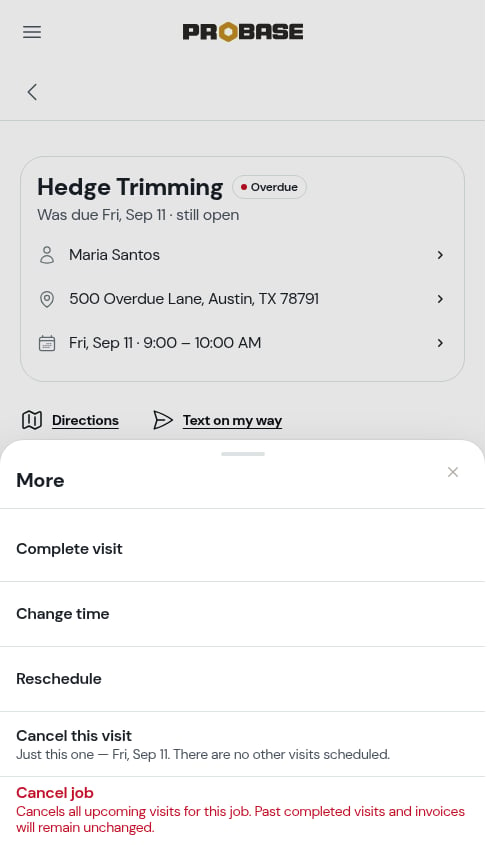 It's second from the bottom of the sheet, with a line underneath naming the dates involved — *Just this one — Fri, Aug 28. Your next visit is scheduled for Fri, Sep 4.* — so you know what you're ending and what's still standing before you tap.
If this is the last visit on the books, the line reads *Just this one — Fri, Aug 28. There are no other visits scheduled.*
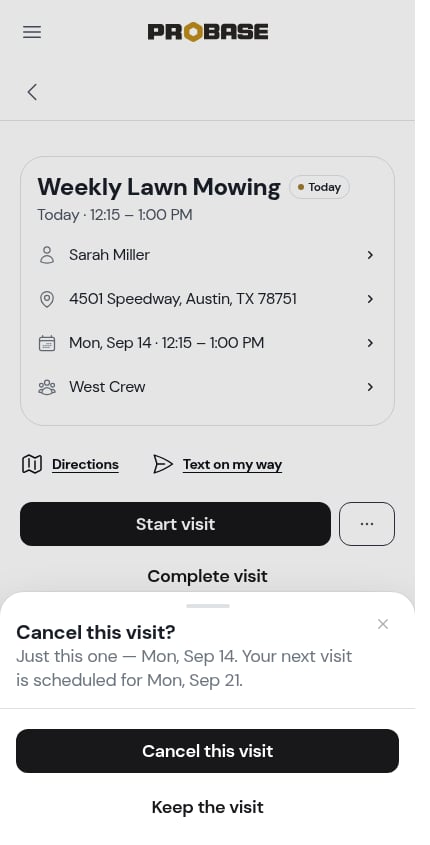
A sheet slides up headed **Cancel this visit?**. Tap the solid **Cancel this visit** to go ahead, or **Keep the visit** to back out — nothing is written until you confirm.
It's second from the bottom of the sheet, with a line underneath naming the dates involved — *Just this one — Fri, Aug 28. Your next visit is scheduled for Fri, Sep 4.* — so you know what you're ending and what's still standing before you tap.
If this is the last visit on the books, the line reads *Just this one — Fri, Aug 28. There are no other visits scheduled.*
A sheet slides up headed **Cancel this visit?**. Tap the solid **Cancel this visit** to go ahead, or **Keep the visit** to back out — nothing is written until you confirm.
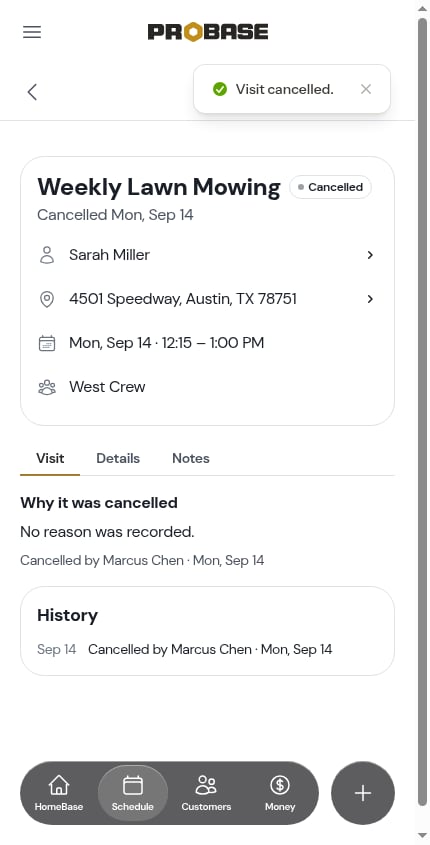
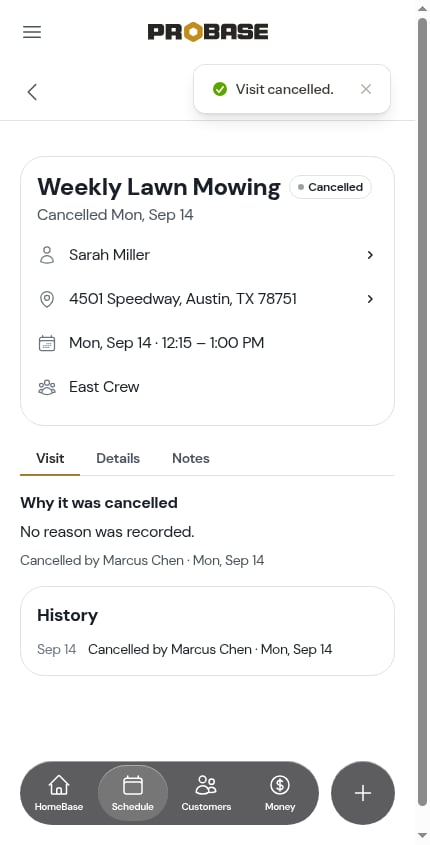
 The visit is now marked **Cancelled** and the page re-renders into the cancelled state.
 ## Moving charges and notes forward
If the visit has **its own** [charges](/routes/visit-charges) or notes on it, **and** another visit is already scheduled, the sheet asks what to do with them rather than quietly throwing them away:
> This visit has Hedge trim · \$35.00 and notes on it. Move them to the next visit — Fri, Sep 4?
## Moving charges and notes forward
If the visit has **its own** [charges](/routes/visit-charges) or notes on it, **and** another visit is already scheduled, the sheet asks what to do with them rather than quietly throwing them away:
> This visit has Hedge trim · \$35.00 and notes on it. Move them to the next visit — Fri, Sep 4?
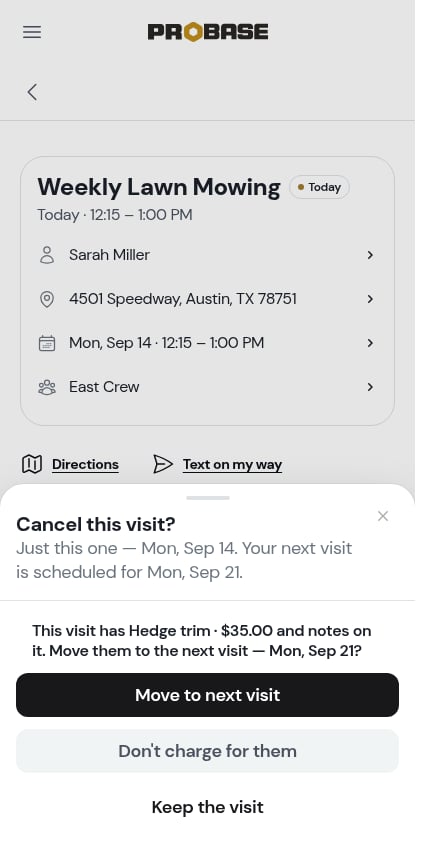 You get two answers:
* **Move to next visit** — the charges and your notes are re-parented onto the next scheduled visit. They'll be billed when *that* visit is completed. The cancelled visit records why: *Items moved to Fri, Sep 4.*
* **Don't charge for them** — the visit is cancelled and the charges go with it.
You get two answers:
* **Move to next visit** — the charges and your notes are re-parented onto the next scheduled visit. They'll be billed when *that* visit is completed. The cancelled visit records why: *Items moved to Fri, Sep 4.*
* **Don't charge for them** — the visit is cancelled and the charges go with it.
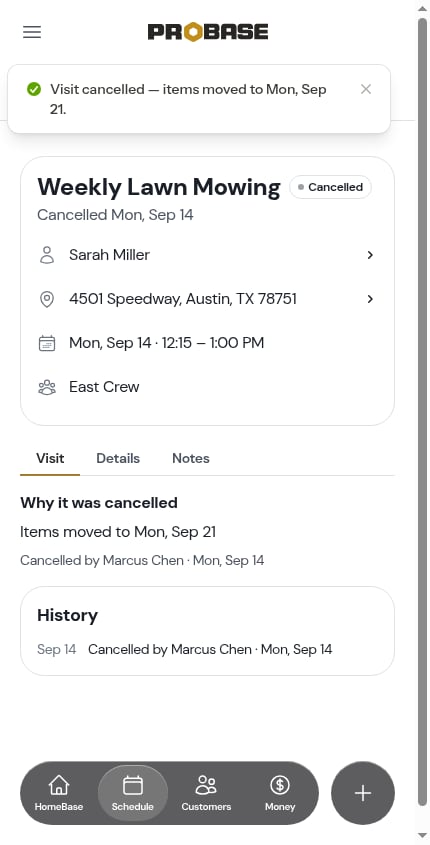 The question is only ever asked about the visit's **own** charges. A standing charge on the job rides every visit anyway, so it isn't something to move — which is why most cancels ask nothing at all and go straight to the confirm.
## Nothing is billed for a cancelled visit
ProBase bills a visit when it's **completed**, so a cancelled visit never creates a charge. That's true whether or not you moved the charges forward — if you moved them, they're billed once, when the next visit completes.
The question is only ever asked about the visit's **own** charges. A standing charge on the job rides every visit anyway, so it isn't something to move — which is why most cancels ask nothing at all and go straight to the confirm.
## Nothing is billed for a cancelled visit
ProBase bills a visit when it's **completed**, so a cancelled visit never creates a charge. That's true whether or not you moved the charges forward — if you moved them, they're billed once, when the next visit completes.
 ## Offering a credit on a subscription job
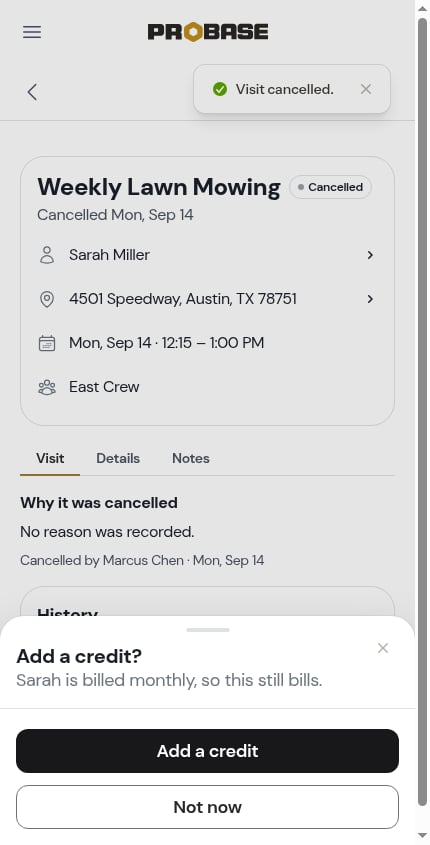
Customers on a **subscription** job are billed on their own schedule, whether or not a particular visit happened. So after cancelling a visit on a subscription job, ProBase offers you the chance to put that right:
> **Add a credit?**
> Sarah is billed monthly, so this still bills.
## Offering a credit on a subscription job
Customers on a **subscription** job are billed on their own schedule, whether or not a particular visit happened. So after cancelling a visit on a subscription job, ProBase offers you the chance to put that right:
> **Add a credit?**
> Sarah is billed monthly, so this still bills.
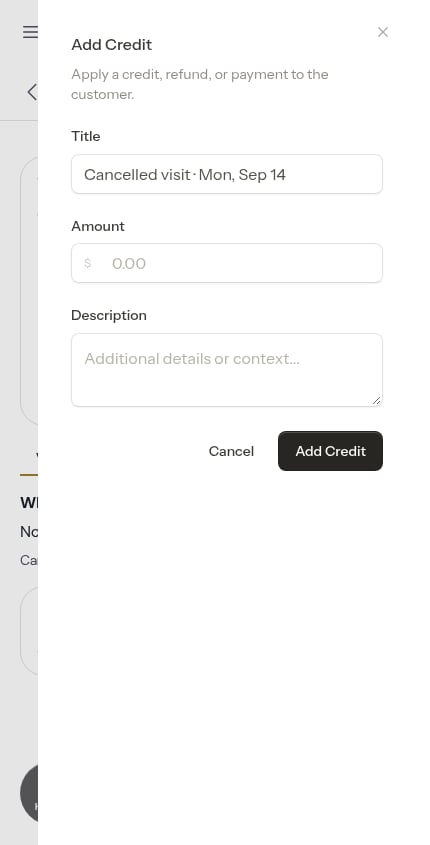
 Tap **Add a credit** and the credit form opens against that customer, with the title already filled in — *Cancelled visit · Fri, Aug 28* — so the ledger row says what it's for. Set the amount and save.
 Tap **Not now** if you'd rather leave the billing alone. Nothing is credited automatically — the offer is a prompt, never an action taken on your behalf.
See [Customer balances](/billing/customer-balances) for how credits show up on the account.
## Cancelling the whole job
**Cancel job** is the last row of the **⋯ More** sheet, in red. It ends the job, not just this visit.
Tap **Not now** if you'd rather leave the billing alone. Nothing is credited automatically — the offer is a prompt, never an action taken on your behalf.
See [Customer balances](/billing/customer-balances) for how credits show up on the account.
## Cancelling the whole job
**Cancel job** is the last row of the **⋯ More** sheet, in red. It ends the job, not just this visit.
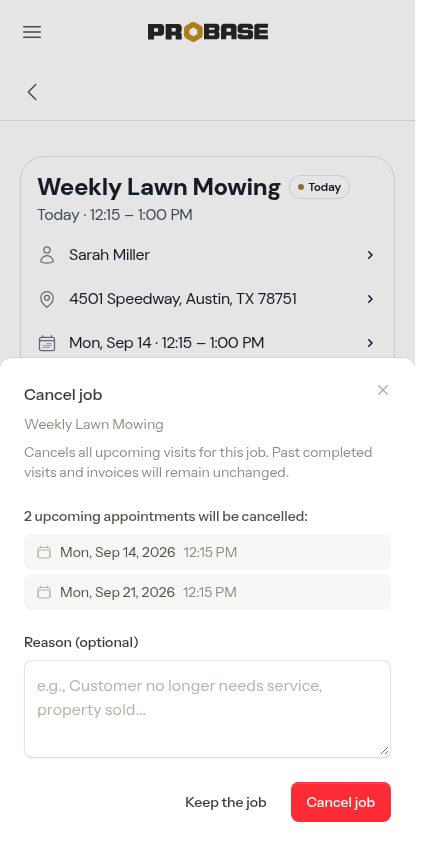 * Every **upcoming** visit for the job is cancelled
* Past completed visits and the invoices for them are untouched
* You can add an optional reason
Tap **Cancel job** to confirm, or **Keep the job** to back out.
* Every **upcoming** visit for the job is cancelled
* Past completed visits and the invoices for them are untouched
* You can add an optional reason
Tap **Cancel job** to confirm, or **Keep the job** to back out.
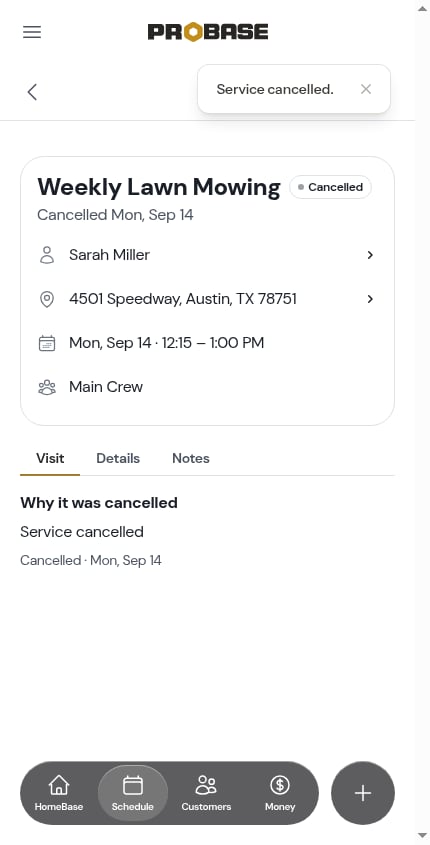 Cancelling a job can't be undone. To start the work up again you'd create a new job for the customer.
## What a cancelled visit looks like
A cancelled visit keeps the same page, but everything that captures work drops away — no timer, no briefing, no checklists, no charge row. There's nothing to do on it any more.
The **Visit** tab leads with **Why it was cancelled**:
Cancelling a job can't be undone. To start the work up again you'd create a new job for the customer.
## What a cancelled visit looks like
A cancelled visit keeps the same page, but everything that captures work drops away — no timer, no briefing, no checklists, no charge row. There's nothing to do on it any more.
The **Visit** tab leads with **Why it was cancelled**:
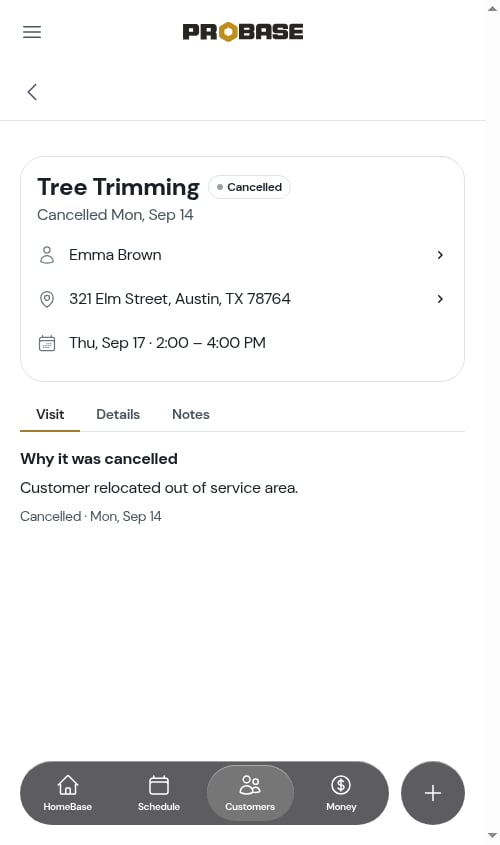 * The note ProBase recorded — for example *Items moved to Fri, Sep 4* — or the reason entered when the job was cancelled
* *No reason was recorded.* when there's nothing to say
* The history line underneath: *Cancelled by Callie Gates · Wed, Aug 26*
The header still shows the customer and property rows, so you can still reach the customer about a visit you called off this morning. The [History card](/routes/timing-a-visit#the-history-card) at the bottom of the tab holds the full log.
Visits marked **Skipped** on older jobs still show correctly wherever they appear — that status is part of your history. New visits are cancelled rather than skipped.
## Cancelling from the day's list
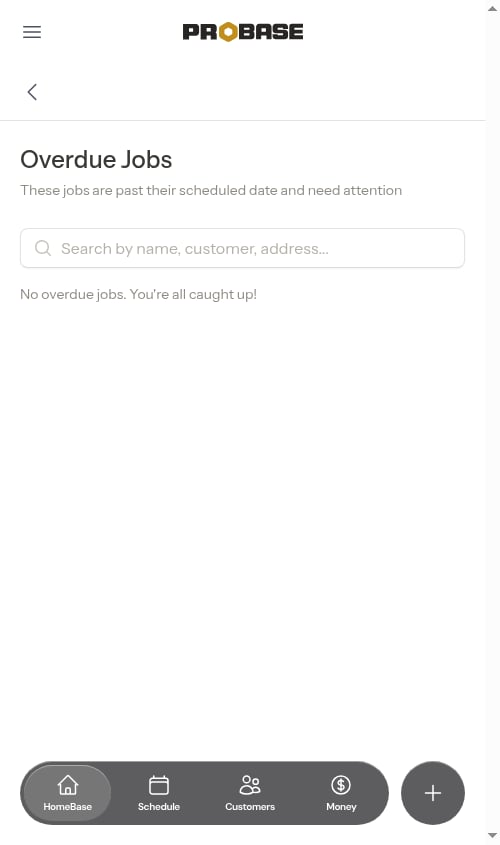
You don't have to be on the visit page. Overdue visits can be cleared the same way — open the visit from [Overdue Jobs](/scheduling/overdue-jobs), tap **⋯ More → Cancel this visit**, and the list drops it.
* The note ProBase recorded — for example *Items moved to Fri, Sep 4* — or the reason entered when the job was cancelled
* *No reason was recorded.* when there's nothing to say
* The history line underneath: *Cancelled by Callie Gates · Wed, Aug 26*
The header still shows the customer and property rows, so you can still reach the customer about a visit you called off this morning. The [History card](/routes/timing-a-visit#the-history-card) at the bottom of the tab holds the full log.
Visits marked **Skipped** on older jobs still show correctly wherever they appear — that status is part of your history. New visits are cancelled rather than skipped.
## Cancelling from the day's list
You don't have to be on the visit page. Overdue visits can be cleared the same way — open the visit from [Overdue Jobs](/scheduling/overdue-jobs), tap **⋯ More → Cancel this visit**, and the list drops it.
 ## Who can cancel
Cancelling a visit needs the cancel permission, and only on a visit assigned to a crew you work. Roles that can't cancel don't see the row in the sheet at all. **Cancel job** needs permission over the job itself. See [Roles and permissions](/team/roles-and-permissions).
Marketplace visits can't be cancelled from ProBase — that happens in the marketplace app. See [Marketplace jobs](/marketplace/marketplace-jobs).
## Next steps
* [Rescheduling jobs](/scheduling/rescheduling-jobs) — move a visit instead of ending it
* [Charges on a visit](/routes/visit-charges) — what gets moved forward
* [Managing services](/customers/managing-services#cancel-job) — cancelling a job from the job page
## Who can cancel
Cancelling a visit needs the cancel permission, and only on a visit assigned to a crew you work. Roles that can't cancel don't see the row in the sheet at all. **Cancel job** needs permission over the job itself. See [Roles and permissions](/team/roles-and-permissions).
Marketplace visits can't be cancelled from ProBase — that happens in the marketplace app. See [Marketplace jobs](/marketplace/marketplace-jobs).
## Next steps
* [Rescheduling jobs](/scheduling/rescheduling-jobs) — move a visit instead of ending it
* [Charges on a visit](/routes/visit-charges) — what gets moved forward
* [Managing services](/customers/managing-services#cancel-job) — cancelling a job from the job page