> ## Documentation Index
> Fetch the complete documentation index at: https://docs.probaseapp.com/llms.txt
> Use this file to discover all available pages before exploring further.
# Rebalancing the day
> Move work between crews so one day isn't overloaded while another is light
## What this is
Reordering fixes the order of one crew's stops. Sometimes that isn't the problem — one crew has eleven jobs and finishes at seven, the other has four and is done by one. **Rebalance this day** looks at every crew at once and proposes moving jobs between them so the day is shared out and the total driving comes down.
Nothing changes until you say so. You get a full preview first.
Rebalancing is only offered on teams with **more than one crew**, and only to people whose role lets them plan routes for all of them. See [Roles and permissions](/team/roles-and-permissions).
## Open it
Three places lead to the same screen:
* **Schedule → Day view → ⋯ More → Rebalance this day**
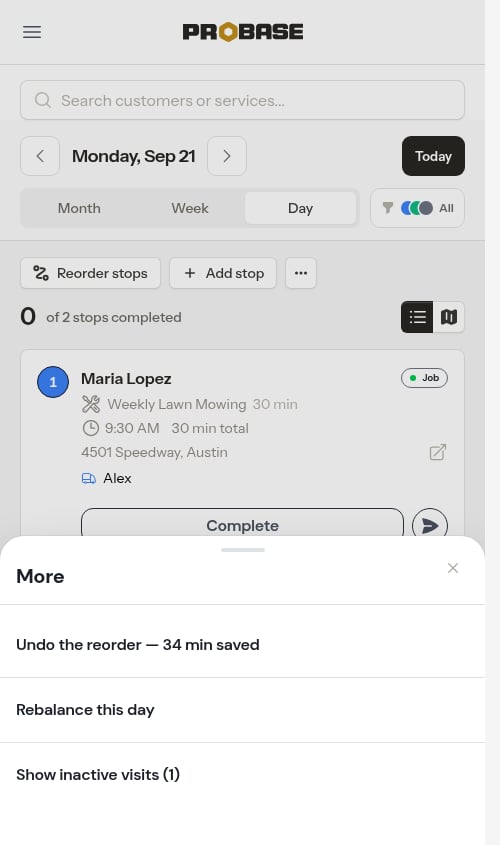 * **The day note** on the Day view, when a crew's day won't fit its hours and no reordering would help — the note's verb reads **Rebalance**
* **HomeBase** — the *"Move work to another crew"* row in [Plan your day](/scheduling/plan-your-day)
## Reading the proposal
The screen is headed **Balance workload across crews**, with one sentence saying what the change is worth — *"Saves 52 min total drive time by rebalancing jobs evenly across crews."* If the shuffle costs driving rather than saving it (which happens when you're evening out the workload rather than shortening the day), the sentence says that honestly instead: *"Adds 12 min total drive time…"*.
* **The day note** on the Day view, when a crew's day won't fit its hours and no reordering would help — the note's verb reads **Rebalance**
* **HomeBase** — the *"Move work to another crew"* row in [Plan your day](/scheduling/plan-your-day)
## Reading the proposal
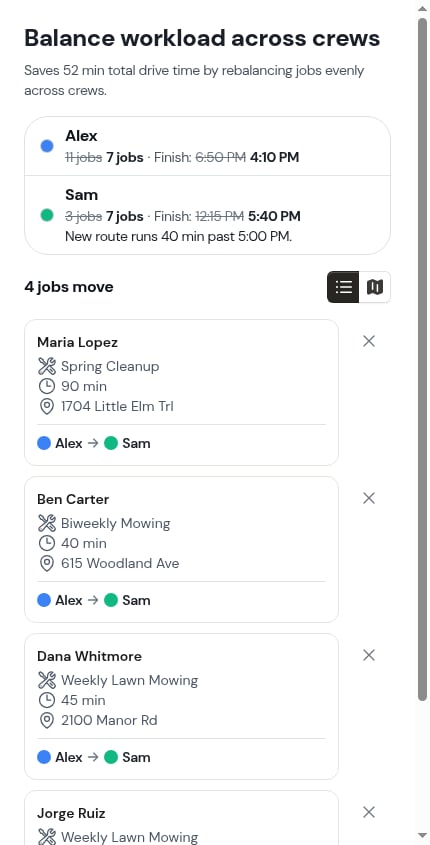
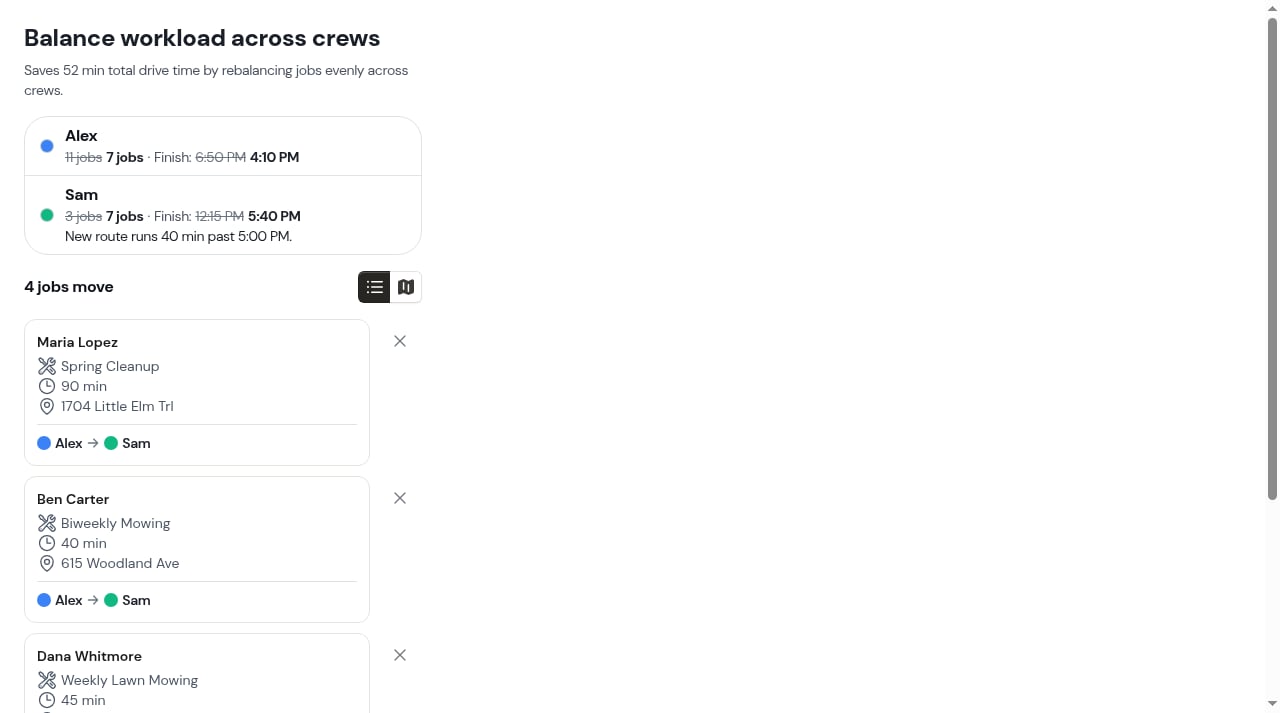
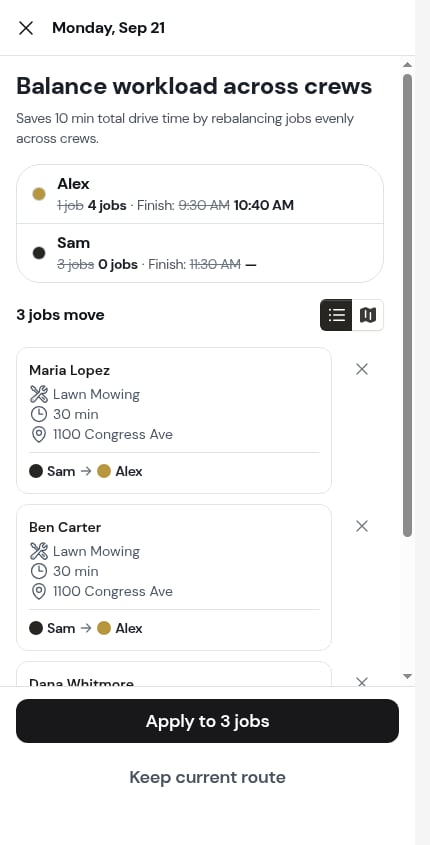
The screen is headed **Balance workload across crews**, with one sentence saying what the change is worth — *"Saves 52 min total drive time by rebalancing jobs evenly across crews."* If the shuffle costs driving rather than saving it (which happens when you're evening out the workload rather than shortening the day), the sentence says that honestly instead: *"Adds 12 min total drive time…"*.
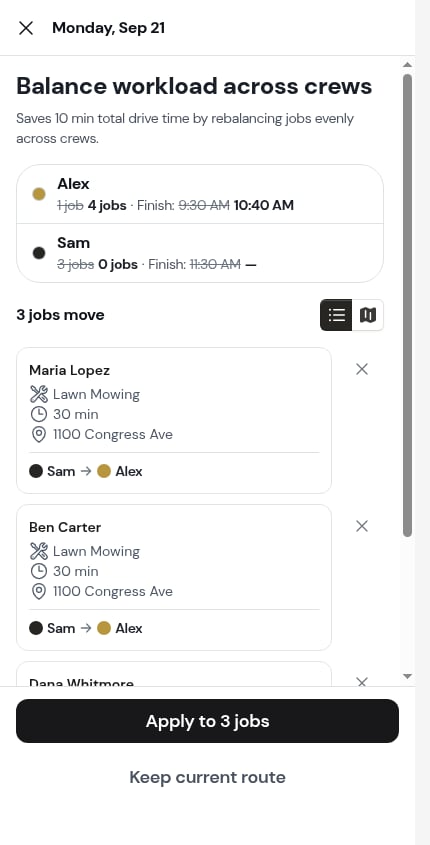 Underneath, one row per crew shows both sides of the change: how many jobs each crew has now and would have after, and what time each would finish. If the proposed route would push a crew past its **End time**, its row says so — *"New route runs 40 min past 5:00 PM."*
 ### List and Map
A toggle switches between two ways of reading the same proposal, with the count beside it — *"4 jobs move"*.
* **List** — one card per job that would move, with the handover line on it: *"Alex → Sam"*.
* **Map** — both crews' routes after the change, each job drawn in the colour of the crew taking it.
### List and Map
A toggle switches between two ways of reading the same proposal, with the count beside it — *"4 jobs move"*.
* **List** — one card per job that would move, with the handover line on it: *"Alex → Sam"*.
* **Map** — both crews' routes after the change, each job drawn in the colour of the crew taking it.
 ## Leaving a job out
Some jobs shouldn't move — the customer knows your driver, the crew has the equipment, whatever the reason. Tap the **✕** on a job card and ProBase keeps it where it is and works the rest of the day out again. The card then reads *"Stays with Sam"* instead of showing a handover, and every total above it restates itself.
## Leaving a job out
Some jobs shouldn't move — the customer knows your driver, the crew has the equipment, whatever the reason. Tap the **✕** on a job card and ProBase keeps it where it is and works the rest of the day out again. The card then reads *"Stays with Sam"* instead of showing a handover, and every total above it restates itself.
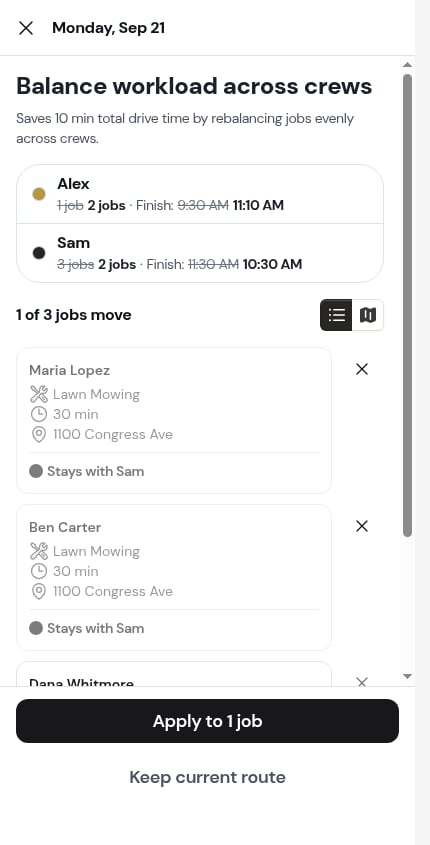 Tap the **✕** again to put a job back. If you leave every moving job out there's nothing to apply, and the summary says so: *"Nothing moves. Put a job back to see what rebalancing would save."*
ProBase balances at most three crews in one pass. With a bigger fleet it works in groups and tells you which crews this proposal covers: *"Balancing Alex, Sam and Jordan. Add more crews and ProBase balances them in groups of three."*
## Applying it
* **Apply to 4 jobs** writes the change — the jobs move to their new crews and every affected stop is re-timed.
* **Keep current route** closes the screen and writes nothing.
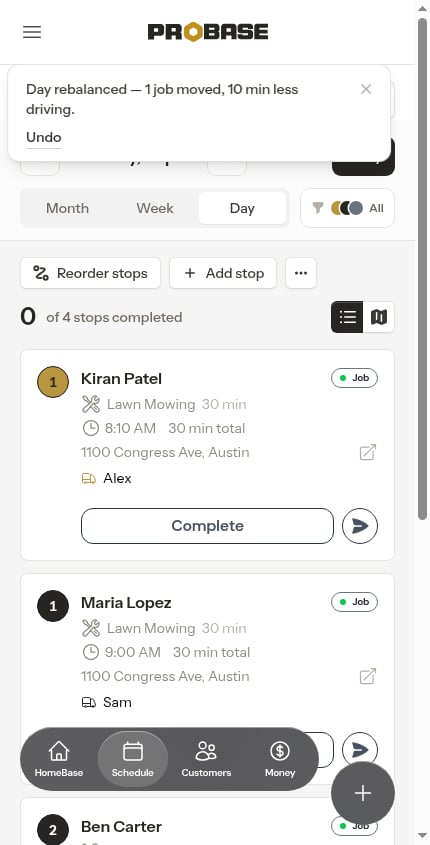
After applying, a message confirms what happened — *"Day rebalanced — 4 jobs moved, 52 min less driving."* — with **Undo** beside it. If evening out the workload cost driving rather than saving it, the message says so instead: *"Day rebalanced — 4 jobs moved, 12 min more driving."*
Tap the **✕** again to put a job back. If you leave every moving job out there's nothing to apply, and the summary says so: *"Nothing moves. Put a job back to see what rebalancing would save."*
ProBase balances at most three crews in one pass. With a bigger fleet it works in groups and tells you which crews this proposal covers: *"Balancing Alex, Sam and Jordan. Add more crews and ProBase balances them in groups of three."*
## Applying it
* **Apply to 4 jobs** writes the change — the jobs move to their new crews and every affected stop is re-timed.
* **Keep current route** closes the screen and writes nothing.
After applying, a message confirms what happened — *"Day rebalanced — 4 jobs moved, 52 min less driving."* — with **Undo** beside it. If evening out the workload cost driving rather than saving it, the message says so instead: *"Day rebalanced — 4 jobs moved, 12 min more driving."*
 If a stop on the day is **already done**, the proposal warns you before you apply: **A stop on this day is already done — This can't be undone.** You can still apply it — there's simply no going back, so the message afterwards carries no **Undo**.
## Undoing it
**Undo** puts every moved stop back to the crew and the time it had — *"Put back — your day is as it was before the rebalance."*
It's available until your crews start working the day. Once the first stop on the day is completed, or the day has passed, it expires, and ProBase tells you rather than pretending: *"That rebalance can't be undone anymore — a stop on this day has been worked, or the day has passed."*
The undo also lives in **⋯ More → Undo the reorder** on the Day view for as long as it's good, so you don't have to catch the message.
If you've since moved those stops by hand, there's nothing left for ProBase to put back, and it says so: *"Nothing left to put back — every moved stop has since been changed by hand."*
## The other answers
A day doesn't always have a useful shuffle in it, and ProBase tells you which case you're in rather than showing a blank screen.
| What the screen says | What it means |
| ------------------------------------------------------------------------------------ | ---------------------------------------------------------------------------------------------------------- |
| **Working out a better order…** *Checking the drive between your stops.* | ProBase is thinking. **Cancel** backs out; nothing is written either way. |
| **This is already the best order — nothing to change.** | No job on the day would be better off with another crew. **Close** leaves it alone. |
| **Couldn't work out a better order right now.** *Your day is unchanged.* | The routing service couldn't answer — usually an address it can't place on the map. **Try again** re-asks. |
| **The stops you kept in place are booked too tight to balance the day around them.** | The stops holding their times leave no room to fit another crew's work between them. Nothing is written. |
If a stop on the day is **already done**, the proposal warns you before you apply: **A stop on this day is already done — This can't be undone.** You can still apply it — there's simply no going back, so the message afterwards carries no **Undo**.
## Undoing it
**Undo** puts every moved stop back to the crew and the time it had — *"Put back — your day is as it was before the rebalance."*
It's available until your crews start working the day. Once the first stop on the day is completed, or the day has passed, it expires, and ProBase tells you rather than pretending: *"That rebalance can't be undone anymore — a stop on this day has been worked, or the day has passed."*
The undo also lives in **⋯ More → Undo the reorder** on the Day view for as long as it's good, so you don't have to catch the message.
If you've since moved those stops by hand, there's nothing left for ProBase to put back, and it says so: *"Nothing left to put back — every moved stop has since been changed by hand."*
## The other answers
A day doesn't always have a useful shuffle in it, and ProBase tells you which case you're in rather than showing a blank screen.
| What the screen says | What it means |
| ------------------------------------------------------------------------------------ | ---------------------------------------------------------------------------------------------------------- |
| **Working out a better order…** *Checking the drive between your stops.* | ProBase is thinking. **Cancel** backs out; nothing is written either way. |
| **This is already the best order — nothing to change.** | No job on the day would be better off with another crew. **Close** leaves it alone. |
| **Couldn't work out a better order right now.** *Your day is unchanged.* | The routing service couldn't answer — usually an address it can't place on the map. **Try again** re-asks. |
| **The stops you kept in place are booked too tight to balance the day around them.** | The stops holding their times leave no room to fit another crew's work between them. Nothing is written. |
 ## What rebalancing never does
* It never moves a **pinned** stop. See [Pinning a visit's time](/routes/pinning-visit-times).
* It never moves a stop a crew is **already working**.
* It never touches other days. Jobs move for this day only — a recurring job's later visits keep the crew they have.
## Next steps
* [Optimize a route](/routes/optimizing-routes) — reorder one crew's day instead
* [Jobs that need a crew](/scheduling/jobs-without-assigned-crew) — assign and route unassigned work in one pass
* [Daily crew schedules](/routes/daily-crew-schedules) — the day view these tools hang off
## What rebalancing never does
* It never moves a **pinned** stop. See [Pinning a visit's time](/routes/pinning-visit-times).
* It never moves a stop a crew is **already working**.
* It never touches other days. Jobs move for this day only — a recurring job's later visits keep the crew they have.
## Next steps
* [Optimize a route](/routes/optimizing-routes) — reorder one crew's day instead
* [Jobs that need a crew](/scheduling/jobs-without-assigned-crew) — assign and route unassigned work in one pass
* [Daily crew schedules](/routes/daily-crew-schedules) — the day view these tools hang off