> ## Documentation Index
> Fetch the complete documentation index at: https://docs.probaseapp.com/llms.txt
> Use this file to discover all available pages before exploring further.
# Plan your day
> The HomeBase rows that tell you what to fix before your crews roll out
## What this is
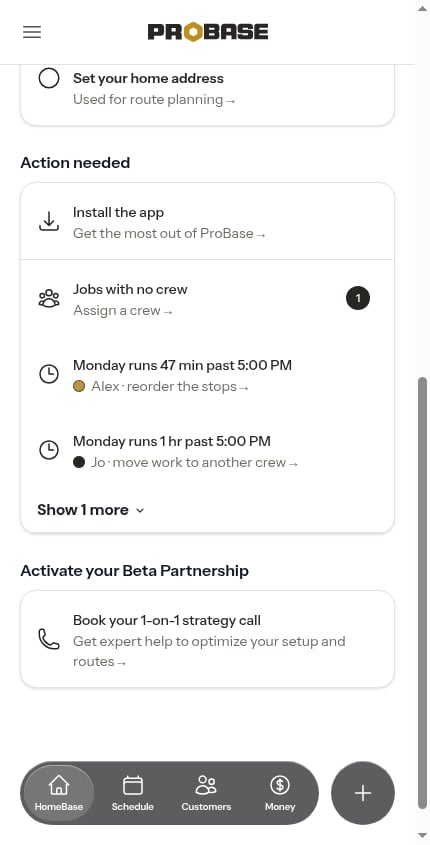
Before your crews leave, HomeBase tells you what's worth a minute of your time: a job nobody's driving to, a day that runs past the crew's end time, and a route that could be shorter. These sit as rows in the **Action needed** section of [HomeBase](/getting-started/homebase), each one a tap away from the screen that fixes it.
 ## Which day is being planned
ProBase plans **today** until 6:00 PM, then switches to **tomorrow**. The idea is simple: in the morning you're fixing the day you're about to drive, and by the evening you're setting up the next one. You never have to tell it which day you mean.
## The rows, in order
The rows always appear in the same order — blockers first, then how the day fits, then what you could save. They're never sorted by when something changed, so you learn where to look.
### Jobs with no crew
A count of the jobs on the planned day that nobody is assigned to, with **Assign a crew** underneath. Tap it to open [Jobs that need a crew](/scheduling/jobs-without-assigned-crew) scoped to that day, where you can hand them out one at a time or let ProBase assign and route them all at once.
This row only appears on teams with more than one crew — with a single crew, new work is assigned automatically.
### How the day fits
*"Tuesday runs 47 min past 5:00 PM"* — the crew's planned work and driving add up to more than the hours you gave them. Underneath is the fix ProBase thinks will help:
* **Reorder the stops** — a better order would bring the day back inside the hours. Opens [Reorder stops](/routes/reordering-routes) for that crew.
* **Move work to another crew** — no reordering can make this day fit, so the work needs to go somewhere else. Opens [Rebalance this day](/routes/rebalancing-the-day).
A crew with no **End time** saved is never warned — you haven't told ProBase when the day is supposed to finish, so it has nothing to measure against. See [Working hours](/getting-started/adding-crews#working-hours).
### Save about 40 min of driving
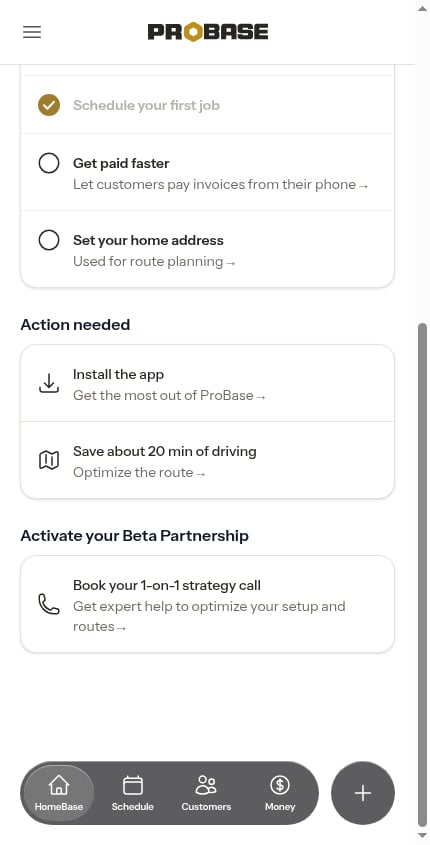
What reordering that crew's route would save. Tap the row and the [Optimize route](/routes/optimizing-routes) preview opens for that crew and starts working the day out.
## Which day is being planned
ProBase plans **today** until 6:00 PM, then switches to **tomorrow**. The idea is simple: in the morning you're fixing the day you're about to drive, and by the evening you're setting up the next one. You never have to tell it which day you mean.
## The rows, in order
The rows always appear in the same order — blockers first, then how the day fits, then what you could save. They're never sorted by when something changed, so you learn where to look.
### Jobs with no crew
A count of the jobs on the planned day that nobody is assigned to, with **Assign a crew** underneath. Tap it to open [Jobs that need a crew](/scheduling/jobs-without-assigned-crew) scoped to that day, where you can hand them out one at a time or let ProBase assign and route them all at once.
This row only appears on teams with more than one crew — with a single crew, new work is assigned automatically.
### How the day fits
*"Tuesday runs 47 min past 5:00 PM"* — the crew's planned work and driving add up to more than the hours you gave them. Underneath is the fix ProBase thinks will help:
* **Reorder the stops** — a better order would bring the day back inside the hours. Opens [Reorder stops](/routes/reordering-routes) for that crew.
* **Move work to another crew** — no reordering can make this day fit, so the work needs to go somewhere else. Opens [Rebalance this day](/routes/rebalancing-the-day).
A crew with no **End time** saved is never warned — you haven't told ProBase when the day is supposed to finish, so it has nothing to measure against. See [Working hours](/getting-started/adding-crews#working-hours).
### Save about 40 min of driving
What reordering that crew's route would save. Tap the row and the [Optimize route](/routes/optimizing-routes) preview opens for that crew and starts working the day out.
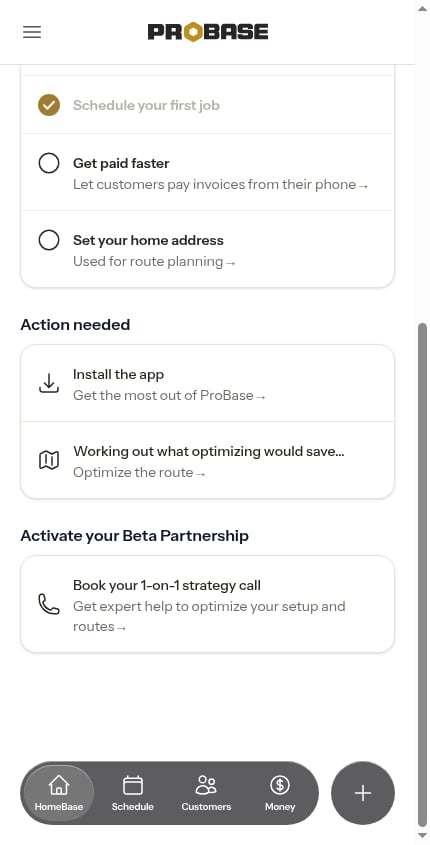
 ProBase doesn't calculate this in advance — it works it out when you open HomeBase. While it's thinking, the row reads *"Working out what optimizing would save…"*.
 If ProBase can't work a figure out, the row reads *"Your routes haven't been optimized yet."* and still takes you to the preview. If the route is already the best order, there's nothing to save and no row at all.
Once you've applied an optimization — or told ProBase to **Keep current route** — that crew's day stops being offered again, until the stops on it change. A day you've already reviewed isn't nagged about.
## More than three rows
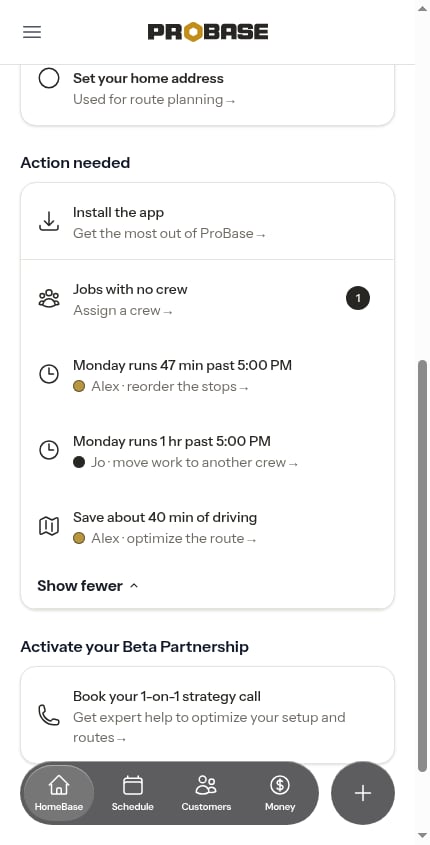
Only the first three rows show. Anything beyond that collapses behind **Show N more**; tap it to see the rest, and **Show fewer** to fold them away again.
If ProBase can't work a figure out, the row reads *"Your routes haven't been optimized yet."* and still takes you to the preview. If the route is already the best order, there's nothing to save and no row at all.
Once you've applied an optimization — or told ProBase to **Keep current route** — that crew's day stops being offered again, until the stops on it change. A day you've already reviewed isn't nagged about.
## More than three rows
Only the first three rows show. Anything beyond that collapses behind **Show N more**; tap it to see the rest, and **Show fewer** to fold them away again.
 ## When nothing is wrong
If there's nothing to fix, the rows are replaced by a single line summarising the day — *"Today's set — 9 stops, 6:30 AM to 3:10 PM."* (or *"Tomorrow's set"* after six in the evening).
## Which crew a row is about
On a team with more than one crew, each crew row carries that crew's colour dot and names the crew in its own line — *"Alex · reorder the stops"*. One problem on two crews is two rows, so you always know who you're fixing. On a single-crew team the crew name is left out.
Crew rows only appear to people whose role lets them plan routes, and only for the crews they're allowed to plan for. See [Roles and permissions](/team/roles-and-permissions).
## Next steps
* [Optimize a route](/routes/optimizing-routes) — review and apply a better stop order
* [Rebalance the day](/routes/rebalancing-the-day) — move work between crews
* [Jobs that need a crew](/scheduling/jobs-without-assigned-crew) — hand out unassigned work
* [Daily crew schedules](/routes/daily-crew-schedules) — the same warnings, on the day itself
## When nothing is wrong
If there's nothing to fix, the rows are replaced by a single line summarising the day — *"Today's set — 9 stops, 6:30 AM to 3:10 PM."* (or *"Tomorrow's set"* after six in the evening).
## Which crew a row is about
On a team with more than one crew, each crew row carries that crew's colour dot and names the crew in its own line — *"Alex · reorder the stops"*. One problem on two crews is two rows, so you always know who you're fixing. On a single-crew team the crew name is left out.
Crew rows only appear to people whose role lets them plan routes, and only for the crews they're allowed to plan for. See [Roles and permissions](/team/roles-and-permissions).
## Next steps
* [Optimize a route](/routes/optimizing-routes) — review and apply a better stop order
* [Rebalance the day](/routes/rebalancing-the-day) — move work between crews
* [Jobs that need a crew](/scheduling/jobs-without-assigned-crew) — hand out unassigned work
* [Daily crew schedules](/routes/daily-crew-schedules) — the same warnings, on the day itself