Overview
ProBase uses Stripe to process credit card payments from your customers. Once connected, customers can pay their balance online through secure payment links. You set this up in the Credit Card Processing via Stripe card on the Payments page.Connect your Stripe account
1
Access settings
Click Payments in the sidebar under Business. The page is headed Billing settings, and the Credit Card Processing via Stripe card sits in the Payment settings group, just under the See all the ways you can get paid row.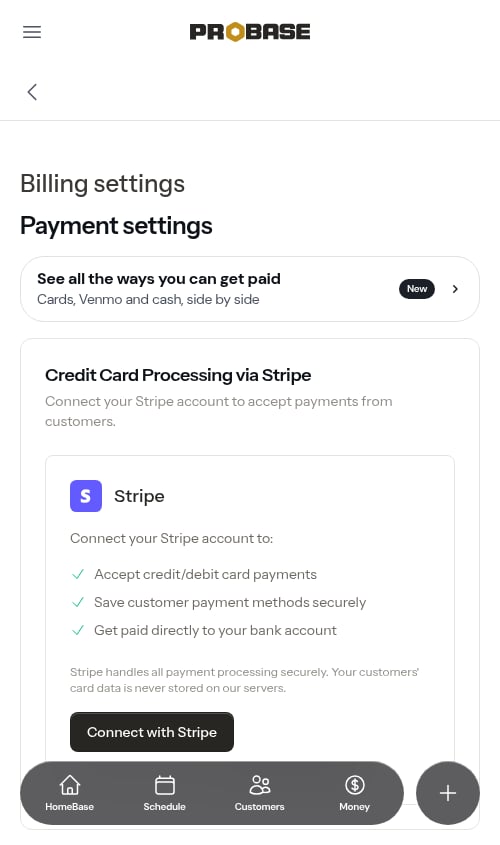
See all the ways you can get paid opens the Getting paid guide — cards, Venmo, Cash App, PayPal and cash, each with where it stands and what to do next. Its Set Up Card Payments button (or Complete Card Setup, once you’ve started) takes you into the same Stripe setup as the steps below. You can also reach the guide from the Choose how customers pay you setup under Make it yours on HomeBase, and you’ll meet it once during onboarding as Step 3 — if you start Stripe from there, you’re returned to that onboarding step when you finish. If you only take payments by hand, the guide’s This is how I get paid button on the cash card ticks off HomeBase’s Choose how customers pay you setup — see Only taking payments by hand?.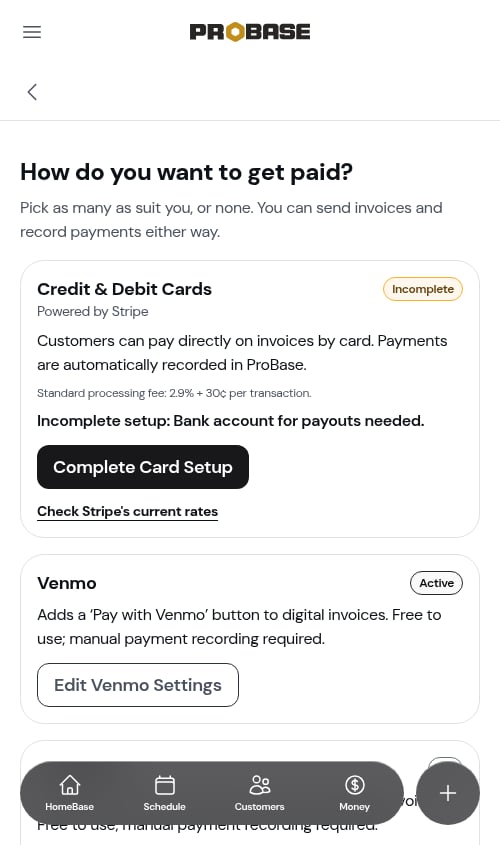
2
Click Connect with Stripe
Before you’ve connected, the card lists what Stripe gives you — accept credit and debit cards, save customer payment methods securely, and get paid directly to your bank account.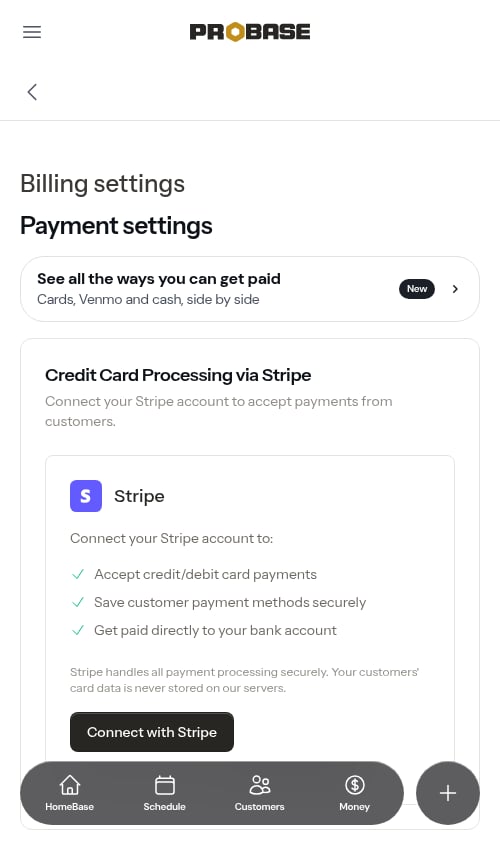
3
Complete the Stripe onboarding
Follow Stripe’s prompts to:
- Verify your business information
- Provide tax details
- Connect your bank account for payouts
- Verify your identity
4
Return to ProBase
Once complete, you’ll be redirected back to ProBase with Stripe connected.
Account status
Your Stripe connection status appears in the Credit Card Processing via Stripe section:Pending setup
Your account is created but needs additional information from Stripe. The card reads Complete Your Stripe Setup — “Your Stripe account setup is incomplete. Please finish the setup to start accepting payments.”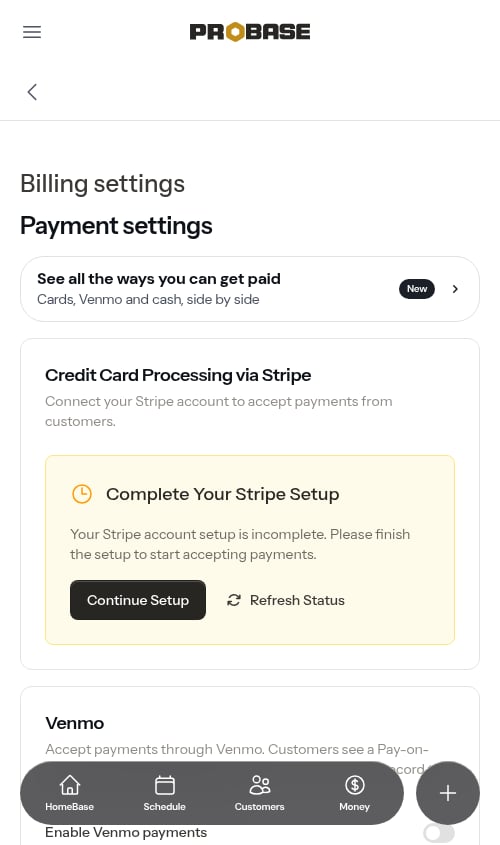
Restricted
Stripe needs additional information or verification, so payments are temporarily disabled.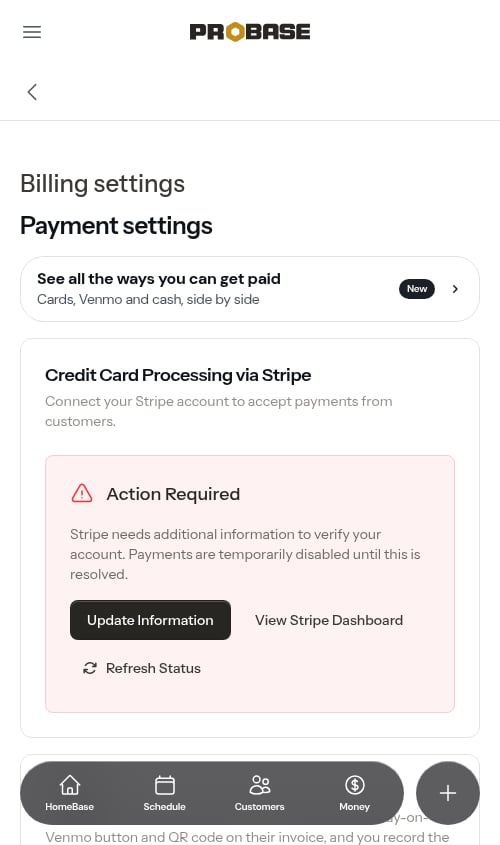
- Stripe is missing required verification information — the items below are past due.
- Stripe is reviewing the information you submitted. No action is needed unless new items appear below.
- Stripe is reviewing this account. No action is needed right now.
Some restricted reasons are simply Stripe reviewing what you already submitted. If the card says no action is needed, there’s nothing to do but wait — check back later and click Refresh Status.
Under review
Stripe has everything it asked for and is checking it. The card reads Under review — “Stripe is reviewing your account. Nothing to do until they finish.” — with View Stripe Dashboard and Refresh Status, but no setup button, because there’s nothing for you to send. In the Getting paid guide the card shows Under Review.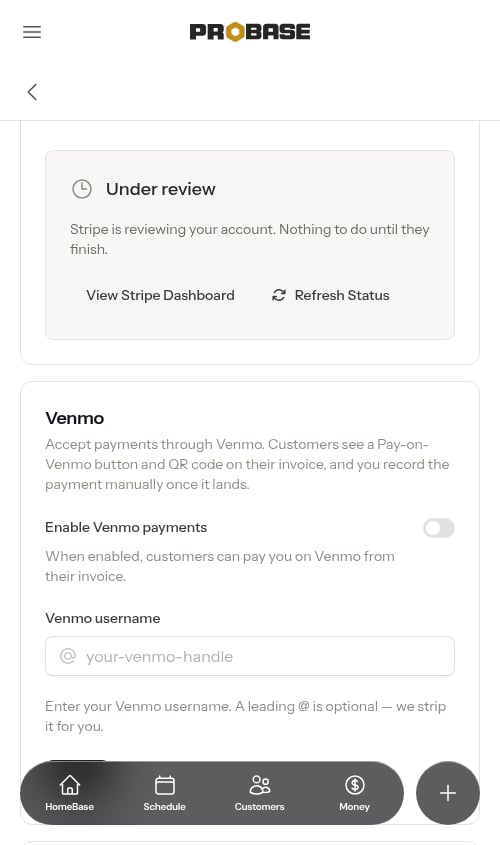
Accounts Stripe has rejected
In rare cases Stripe closes an account outright — for suspected fraud, a terms-of-service issue, a prohibited-business match, or verification that couldn’t be completed in time. These accounts still show as Action Required, but the card names the rejection reason and replaces the setup button with Contact Stripe Support.Active
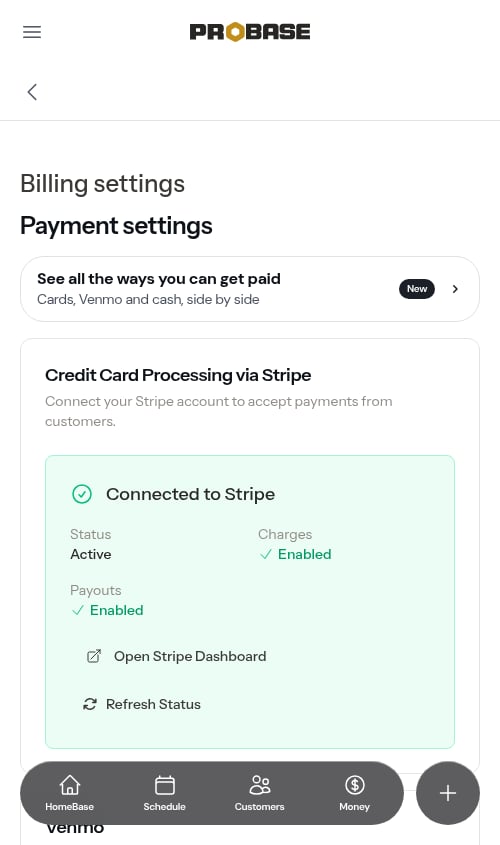
Your account is fully connected and can accept payments. The card turns green and reads Connected to Stripe.- Charges: Enabled - You can accept payments from customers
- Payouts: Enabled - Stripe can send money to your bank account
Limited
Charges are enabled but payouts are on hold pending additional verification. You can still accept payments, but funds won’t be sent to your bank until Stripe completes verification — the card says so directly: “You can accept payments, but payouts to your bank are on hold until verification is complete.”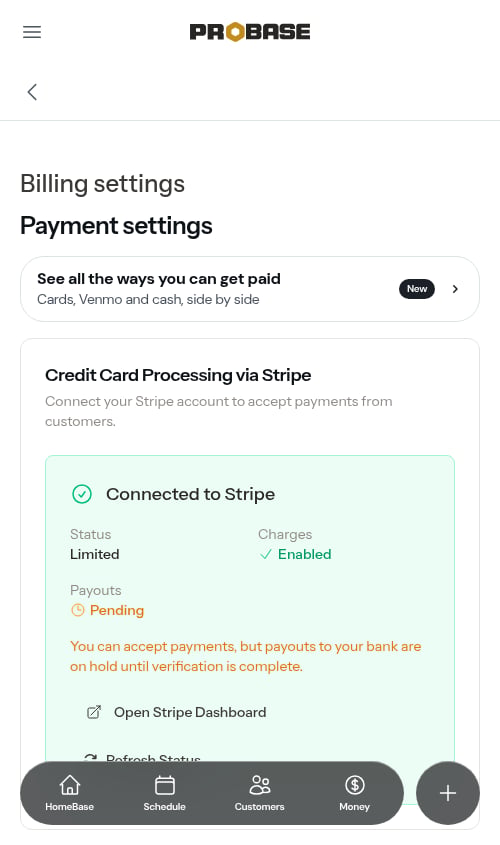
Disconnected
Your Stripe account is no longer linked to ProBase, so customers can’t pay online. This happens when the link between the two is cut on Stripe’s side — most often because someone at your business removed ProBase’s access from the Connected apps area of the Stripe Dashboard, or because the Stripe account itself was closed. The Credit Card Processing via Stripe section goes back to the Connect with Stripe card, with an amber notice at the top explaining what happened:Your Stripe account was disconnected, so customers can’t pay your invoices online right now. Reconnect below to keep accepting card payments.Tap Connect with Stripe to link an account again — see Connect your Stripe account. You can connect the same Stripe account you had before, or a different one.
ProBase notices the disconnect on its own. Stripe tells us the moment access is removed, and if that message doesn’t get through, the next time a customer opens one of your invoices or payment links — or you tap Refresh Status — the Payments page catches up. You may briefly see the old Connected to Stripe card in the meantime.
You don’t have to keep checking this page. A Stripe disconnected update lands in your bell when the link is cut, so you find out on whatever screen you’re already on.
ProBase tells you when the status changes
You don’t have to watch this page for changes. When your Stripe account moves from one state to another, ProBase drops an update in the bell for everyone on your team whose role lets them see payment settings:- Stripe payments are live — setup finished; charges and payouts are both on
- Stripe needs your attention — Stripe paused payments and wants more information
- Payouts paused — you can still take cards, but money isn’t reaching your bank
- Stripe disconnected — the link was cut and customers can’t pay online
Refresh account status
If you’ve made changes in Stripe or completed required steps, click Refresh Status to pull the latest information from Stripe into ProBase. The button appears on the Pending setup and Restricted cards, and on the connected card alongside Open Stripe Dashboard — so you can re-check the connection from any state. Refreshing also updates the Stripe still needs: list, so it’s the quickest way to confirm an item you just submitted has been accepted. If the connection has been cut on Stripe’s side, refreshing is what catches it: the connected card is replaced by the Disconnected notice and a fresh Connect with Stripe button.View Stripe Dashboard
Click Open Stripe Dashboard (labelled View Stripe Dashboard on the Action Required card) to access your Stripe account where you can:- View transaction history
- Manage payouts
- Update bank account information
- View detailed reports
- Configure Stripe settings
What happens after connecting
Once Stripe is connected:- Payment links become active - Customers can complete payments online through the links you share
- Cards are saved securely - Customers can save payment methods for future use (stored by Stripe, not ProBase)
- Funds go to your bank - Stripe deposits payments directly to your connected bank account (typically within 2 business days)
Stripe charges a processing fee for each transaction — the Getting paid guide shows the standard rate (2.9% + 30¢ per transaction) with a link to Stripe’s current rates. On a paid card invoice, your copy shows the Card fee and what’s Net to you under the payments; your customer’s copy never shows the fee.
The rest of the payment settings page
Stripe isn’t the only thing on this page. Reading top to bottom, the Payments page holds two groups:- Payment settings — the See all the ways you can get paid row (tagged New), then Credit Card Processing via Stripe (everything on this page), then Venmo, Cash App and PayPal, optional pay buttons for customers who’d rather not use a card
- Invoice settings — everything about what an invoice looks like to your customer: when it’s due after you send it (Upon receipt, Net 7, Net 15, Net 30, or a custom number of days), whether they see the due date and past-due wording, whether they must rate your service before paying, and how they’re asked for a tip
Troubleshooting
The “Connect with Stripe” button isn’t working
Tapping Connect with Stripe takes you to Stripe’s secure onboarding in the same window; when you finish, Stripe returns you to ProBase. If ProBase can’t reach Stripe at that moment, you’re returned to the Payments page with the message “We couldn’t connect to Stripe right now. Please try again.” — this is usually a temporary hiccup, so wait a moment and tap Connect with Stripe again. If it keeps happening, contact support.”Stripe couldn’t continue your account setup”
If you already have a Stripe account connected and Continue Setup or Update Information can’t get you back into Stripe, you’ll see “Stripe couldn’t continue your account setup. Check your payment-processing status below for what Stripe needs.” This isn’t a temporary glitch, so retrying the button won’t clear it — Stripe is refusing to reopen setup because of the state your account is in. ProBase refreshes your status automatically when this happens, so scroll to the Credit Card Processing via Stripe card and read the reason and the Stripe still needs: list. From there:- Outstanding items are listed — supply them in your Stripe Dashboard, then click Refresh Status.
- The account was rejected — use Contact Stripe Support; only Stripe can revisit that decision.
- Nothing on the card explains it — contact support and mention the message you saw.
My status shows as “Pending” or “Restricted”
Read the Credit Card Processing via Stripe card first — it names the reason and lists whatever Stripe is still waiting on, so you usually don’t need to leave ProBase to find out. Common requirements include:- Additional business verification documents
- Bank account for payouts
- Tax ID confirmation
- Identity verification
Customers can’t complete payments
Check that your account status shows “Active” with both charges and payouts enabled. When card payments aren’t live, customers don’t see a card form on their invoice — they see your Venmo, Cash App or PayPal blocks if you’ve turned them on, or your phone and email with Call and Text buttons so they can ask how to pay. Customers who see “Paying by card isn’t available right now.” are telling you your connection isn’t live. Open Payments, tap Refresh Status, and read the card:- It still says Active — the problem is elsewhere; contact support.
- It flips to the amber disconnected notice — ProBase’s access to your Stripe account was removed. Tap Connect with Stripe to relink; see Disconnected.
- It says Pending or Restricted — finish what Stripe is asking for, as above.