Why this matters
ProBase can text you about your business — a customer paid an invoice, a quote was accepted, something needs your attention — as well as send occasional product news. This page explains how you opt in, what each kind of message covers, and how to change your mind later.Text messages are separate from the alerts that pop up on your phone’s lock screen. Those are push notifications, and they have their own switch on each phone. Changing one doesn’t change the other.
The two kinds of text messages
- Transactional messages — account updates, customer care messages, and service notifications. These are the day-to-day texts about your business.
- Marketing messages — promotional offers and product news from ProBase.
Consent is never a condition of service. You can use every part of ProBase without agreeing to receive text messages, and you can turn texts off at any time.
Opting in during signup
How you’re asked depends on which signup page you used.Standard signup
If you created your account from the normal signup page, Step 1 of 2 — Set up your account shows a short disclosure below the form. It explains that by submitting your contact information you agree that ProBase or its representatives may contact you by email, phone, or SMS, including for marketing purposes and by automatic dialing systems, and that consent is not a condition of service. Your Phone number is required on this version of the form, and tapping Continue opts you in to text messages automatically.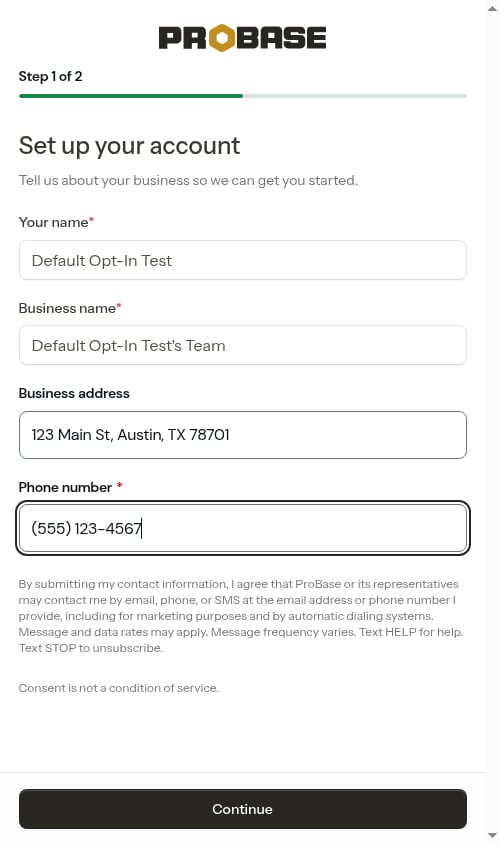
Pro signup link
If you created your account through a ProBase pro signup link (the signup page at /register-pro), the signup screen itself looks the same — email, password, and Create my free account, plus Sign up with Google when it’s available — but the onboarding step that follows asks for your consent explicitly instead of assuming it.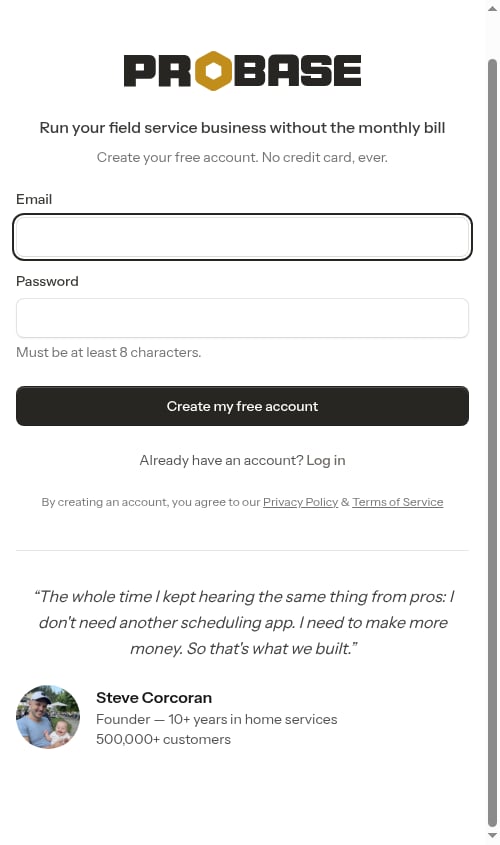
This applies however you signed up from that page — with an email and password, or with Sign up with Google. Both routes lead to the same explicit-consent version of the onboarding step.
- “Yes, I want to receive marketing text messages from ProBase at the number provided, including promotional offers and product news.”
- “Yes, I want to receive transactional text messages from ProBase at the number provided, including account updates, customer care messages, and service notifications.”

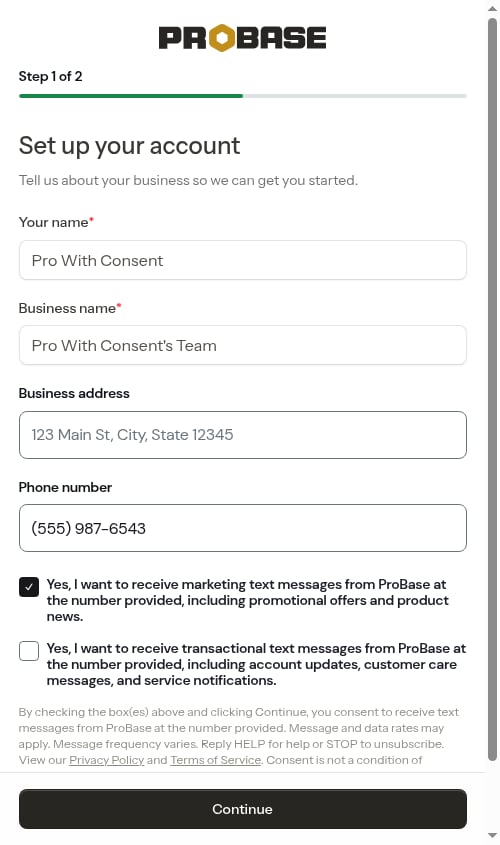
Nothing is recorded if you leave both boxes unchecked — you simply won’t receive text messages, and you can opt in later from your Profile page.
A checked box needs a phone number. If you tick either box while the phone field is empty (or the number is incomplete), tapping Continue won’t submit. An inline message appears under the checkboxes: “Enter a phone number to receive text messages, or uncheck the box above.” Either fill in your number or untick the box — the message disappears as soon as no box is checked.
If you leave onboarding and come back later, your consent choices are remembered and the boxes come back pre-ticked exactly as you left them.
Changing your preference later
Whichever way you signed up, you can change your mind at any time.1
Open your profile
Open the navigation drawer and select My Profile in the footer at the bottom.
2
Find Notification Preferences
Scroll to the Notification Preferences card. It’s headed “Manage how you receive notifications from ProBase.”
3
Toggle SMS notifications
Tick or untick SMS notifications, described as “Receive transactional and marketing text messages, including account updates, service notifications, and promotional offers.” Your preference saves automatically and a Notification preferences updated toast appears — there’s no separate Save button.
Where the toggle starts. If you went through the standard signup, it’s already on. If you used a pro signup link, it starts on only when you ticked the marketing box during onboarding — ticking just the transactional box records your choice but leaves this toggle off. Turn it on here whenever you want.
Related pages
- Push notifications — the separate phone alerts
- Updates — the in-app feed behind the bell
- Creating your account — the full signup walkthrough
- Getting started with onboarding — every onboarding step in detail
- Business Profile — the rest of your profile and business settings