Overview
When a connected marketplace has work near you waiting to be claimed, an Available to claim card appears on HomeBase so you don’t miss it while you’re working in ProBase.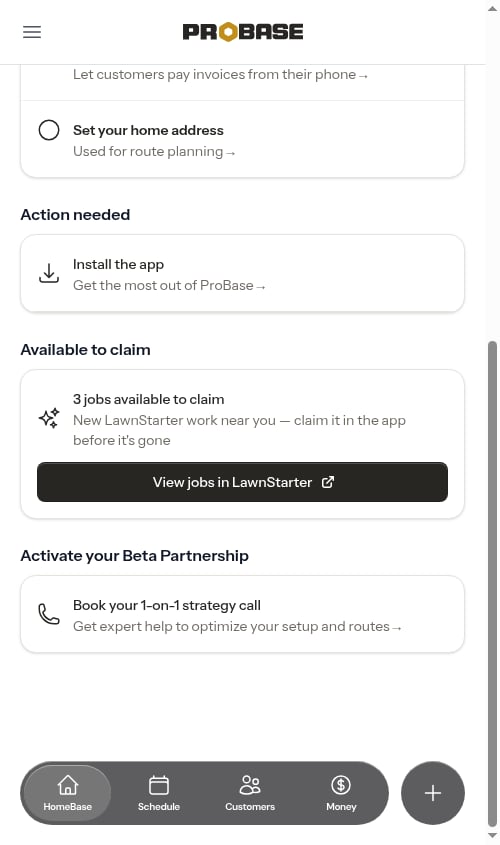
What the number counts
The count is the jobs the marketplace is currently offering you to claim — the same list the button opens in the marketplace app. It’s a straight count of what’s still up for grabs:- Offers you’ve already claimed drop out of the count, because they’re yours now — they arrive on your ProBase schedule instead
- Offers another pro claimed first, or that the marketplace has withdrawn or expired, drop out too
- Work that’s already on your schedule is never counted here, and neither is recurring work the marketplace has lined up for you but hasn’t offered around
If the number here and the number in the marketplace app disagree, the app is the truth — see the count doesn’t match the app below.
Claiming a job
Tap View jobs in LawnStarter (or Lawn Love / Home Gnome) to open the available-jobs list in the marketplace app, where you pick the jobs you want.Claiming happens in the marketplace app, never in ProBase. Once you claim a job, it syncs onto your ProBase schedule on its own — usually within a few minutes, because ProBase checks every few minutes whether your marketplace book has gained a customer. If the customer is new to you, a New LawnStarter Customer! update lands in your Updates feed when they arrive. See How marketplace syncing works.
When the card appears
- You have a Connected marketplace account (see Connecting a marketplace account)
- That account currently has at least one job waiting to be claimed
- You’re a business owner or admin — the same people who can reach your business settings
The count doesn’t match the app
The count is a snapshot rather than a live ticker. ProBase checks with the marketplace every few minutes and reuses that answer in between, so the number can trail what you see in the marketplace app — offers come and go quickly, and one can be claimed by someone else moments after ProBase counted it. That’s normal and nothing to fix. Tap View jobs in LawnStarter and work from the list in the app, which is always the truth. If ProBase can’t reach the marketplace at all when it goes to check, the card simply stays hidden rather than showing a stale or wrong number.Next steps
- Marketplace jobs — what a claimed job looks like in ProBase
- HomeBase — the rest of your daily dashboard
- Marketplace payouts — what the work pays