Overview
The marketplace bills the customer and pays you, so marketplace money is tracked separately from the invoices you send. ProBase keeps it all on one customer record named after the marketplace — a customer called LawnStarter (or Lawn Love / Home Gnome) that appears in your customer list once money starts syncing. That record’s Billing History is your marketplace money ledger: every job you’ve earned on, every tip and fee, and every deposit the marketplace has sent you.Two places show marketplace money, and they answer different questions. A marketplace service page shows a Payout row — what one visit of that service pays you, so you can see what a stop on your route is worth. This ledger shows the running total: everything you’ve earned and everything that’s been deposited.
Marketplace money is visible to business owners and admins, and only when a marketplace account is Connected. If you’re connected to more than one marketplace, each one gets its own customer record and its own ledger.
Opening the ledger
1
Open Customers
Tap Customers and find the record named after your marketplace — for example LawnStarter.
2
Open Billing History
Tap Billing History on that record (or tap the balance at the top of the page) to open the ledger.
Reading the balance
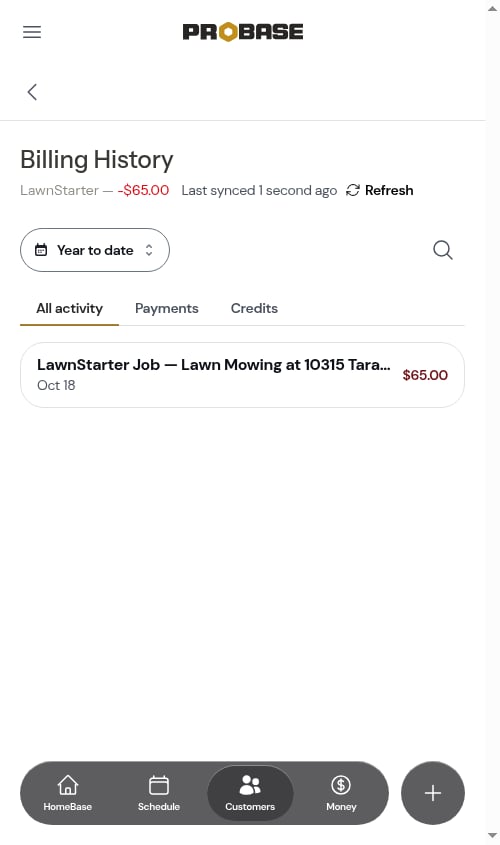
The line under the Billing History heading names the marketplace and shows the running balance. It answers one question: what have you earned since your last deposit?- A red negative amount — for example LawnStarter — -$65.00 — is money you’ve earned since your last deposit that hasn’t been sent yet
- $0.00 means everything you’ve earned so far has been covered by a deposit
- A “credit” amount — for example LawnStarter — $34.50 credit — means a fee, a chargeback, or a correction has landed since your last deposit with no earnings yet to offset it, so the marketplace is currently owed that much back
A deposit closes the books on everything before it. It isn’t subtracted from your running total like a customer payment — when a deposit lands, everything above it is considered settled and the balance starts counting again from the earnings that come after it. That’s the same way the balance is worked out in the marketplace’s own pro app, so the two numbers match.If you’ve never had a deposit yet, the balance is simply your whole synced history.
While a refresh is still running, the balance is a work in progress. Your marketplace history comes across in chunks, and the balance is added up properly once the last chunk has landed. If the number looks off in the middle of a Refresh or a Full re-sync, give it a moment and reload the page — the total corrects itself as soon as the run finishes.
What’s in the ledger
The ledger holds two kinds of entry — the amounts that build up what you’re owed, and the deposits that settle them: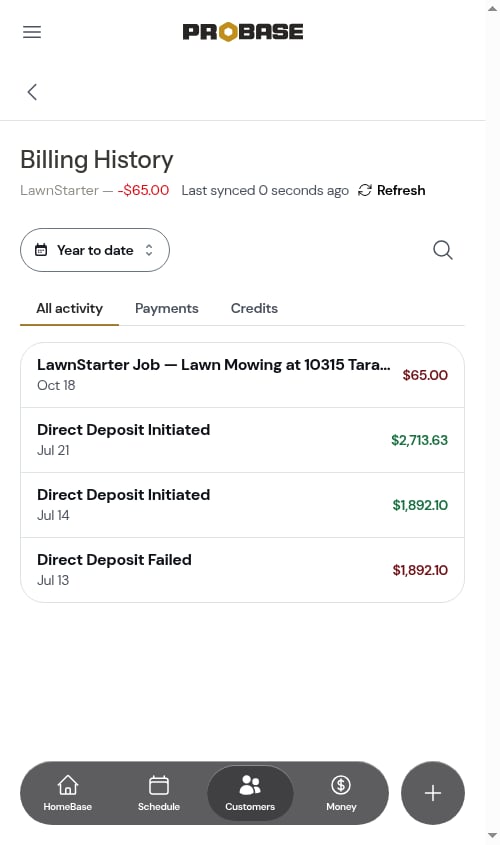
Deposits reach ProBase two ways, and both count the same. The marketplace announces a payout on its deposit feed (Direct Deposit Initiated) and also records the payout itself on your billing history (Payout Confirmation …). Whichever one it is, ProBase treats it as money sent: it shows in green, sits under the Payments tab, and settles everything above it.
A deposit that doesn’t go through arrives as Direct Deposit Failed, backing out the full amount of the deposit it voids so your ledger reflects what actually reached your bank. You don’t need to correct anything by hand.
Entry details
Tap any entry to open a read-only panel with the amount breakdown (subtotal, tax, total) plus whatever the marketplace sent along — the property, the service, and the appointment date for job earnings, or the confirmation number for a deposit.Some entries have no job attached — a bonus, a general adjustment, or earnings from a visit that happened before you connected and so was never on your ProBase schedule. Those are full ledger entries all the same (and count toward the balance when they fall after your last deposit); their detail panel simply has no property, service, or visit to show.
Finding an entry
The ledger uses the same controls as any other customer’s billing history:- The period chip at the top limits the entries to a period — Year to date to start with, or anything from Today to All time or a Custom range
- The search icon searches the entries by title
- The tabs — All activity, Payments, and Credits — narrow the list. There’s no Invoices tab here, because the marketplace never sends you invoices
Keeping it current
The Last synced … Refresh line at the top of the page is the update-now path for marketplace money — tap Refresh to pull the latest earnings and deposits straight from the marketplace. The link reads Syncing… with a spinning arrow while it works (the timestamp stays put), and the page reloads with whatever came across.Your full money history is long, so this one takes longer than refreshing a customer or a job — it keeps saying Syncing… while the earnings and deposits come across in the background, then reloads on its own. If it can’t finish, the line turns into a short message with a Try again link.
The 15-minute background check that keeps your jobs current doesn’t pull the money side, so Refresh here is the fastest way to see a deposit that just landed. See How marketplace syncing works.
If the balance doesn’t look right
Because a deposit settles everything above it, an entry filed as the wrong kind can throw the running total off — a payout that wasn’t recognized as a deposit, for example, wouldn’t close the books the way it should. Tap Refresh at the top of the Billing History (or run a Full re-sync on the account’s card under Integrations). ProBase re-reads your marketplace history and, as well as picking up anything new, re-checks how every entry it already has is filed — correcting any that were sorted wrongly and working the balance out again.A refresh only ever corrects which kind an entry is; the amounts and dates the marketplace sent are never changed, and nothing is added or removed from your history. So it’s always safe to run when a number looks off — and if the total still doesn’t match the marketplace’s own pro app afterwards, get in touch.
What marketplace money does not affect
- The Needs your attention rows, Still owed, Not yet sent, and the invoice lists on the Money page count only your own ProBase invoices. Deposits the marketplace sent do show in the Received figure, but on their own line — LawnStarter pays you directly. Nothing to collect. — kept apart from what Your customers paid you
- Marketplace jobs don’t create invoices, so nothing to send or collect appears when one is completed
- Marketplace entries carry no Paid / Unpaid status, because there’s nothing for you to collect — the marketplace already handled the customer’s payment
- The marketplace customers you serve have no balance or billing history of their own in ProBase; the money sits on the marketplace’s record instead
This record sticks around. Syncing removes marketplace customers who leave your book, but the record named after the marketplace is never one of them — your earnings and deposit history stays intact even when your customer list changes a lot. See Work that disappears from the marketplace.
The ledger holds your complete marketplace billing history, not just the visits sitting on your ProBase schedule — it goes all the way back through your marketplace record, however many years that is. Earnings from a job that was never synced — older history, or work finished before you connected — appear here too; they just aren’t linked to a visit you can tap through to.Because it pulls everything, the very first time your money history syncs it can take a few minutes to land, and it arrives in chunks rather than all at once. See the note on reading the balance mid-sync.
Next steps
- Marketplace jobs — the work behind the earnings
- Marketplace customers — why the customers themselves have no balance
- How marketplace syncing works — refresh timing